







.png%3Falt%3Dmedia%26token%3D345be5f5-265a-4027-a3ee-9a4d1449b5bd&w=3840&q=75)
How Developers Can Build Their First AI Project
Key Highlights
Building your first artificial intelligence project is a key step in software development.
Start with simple ideas like a chatbot or spam classifier to learn the basics.
Understanding deep learning and nlp concepts is crucial for success.
This guide covers the entire process, from finding a dataset to building a model.
Focus on hands-on practice for the best ai coding experience in computer science.
Your project will enhance your portfolio and prepare you for job interviews.
Introduction
Are you ready to start your first artificial intelligence project? It can be exciting to step into the world of AI. This guide is here to help you. Building a project is a good way to learn more and use your computer science skills. If you are into nlp or want to get better at software engineering, making something new by yourself is a good move. You will get important experience from it. Let’s look at the steps you can take to help you begin your journey with artificial intelligence.
Steps Developers Can Take to Build Their First AI Project
 For students and people new to artificial intelligence, starting an AI project can look hard at first. But if you break it down into smaller steps, it gets much easier. You do not have to be an expert in deep learning from the start.
To begin, know what an AI project is and pick an idea that you like. After that, you need to get your data, pick the right programming languages, and make your model. The best way to learn is by trying hands-on coding projects with artificial intelligence. While it's not strictly necessary to learn the history of AI before starting coding practice, gaining some background knowledge can help you better understand the field's core concepts, common challenges, and how AI has evolved, which might inspire your project choices.
1. Understand What an AI Project Really Is
First, you need to know what makes something an AI project. Artificial intelligence means building systems that can do things that need human intelligence. This can be learning, reasoning, or solving problems. In short, it is a simulation of human intelligence in a machine.
A regular coding project uses clear and direct rules. With artificial intelligence, you use machine learning to find patterns in data. You do not have to list out every step, but give the system examples to learn from. Large language models learn how to use and make text in this way.
If you are a student and want to start with AI coding, this is the first key idea. The aim is not to make a program that follows steps. The goal is to build a system that learns as people do.
2. Explore Simple AI Project Ideas for Beginners
Once you know the basics, the next thing to do is find an idea for your project. If you are new, you should start with something easy and not too big. Hard projects can feel like too much and may stop you from moving forward. It is better to work on beginner-friendly coding practice ideas. These projects help you get the main ideas of AI.
Try to think about problems in real life that AI and human language tools can help with. For example, you can try nlp. This helps computers deal with words and speech. You could take text from online reviews or try to spot fake news. These are good ways to start with simple projects.
Here are a few simple AI project ideas for beginners:
Build a chatbot that can answer basic questions.
Create a spam email classifier to filter unwanted messages.
Develop a sentiment analysis tool for online reviews.
Design a simple recommendation system for movies or books.
3. Pick an Idea That Matches Your Skills
Picking a project that matches where you are right now is important. If you are new to programming languages like Python, try to start with a project that does not need big software engineering skills. The idea is to learn and feel good about your work, not get stuck on something too hard.
Look at what you know about coding and working with data. If you are at ease with basic coding, you can try a project that uses data and simple algorithms. The best ai coding practice comes from jobs that push you, but do not make it too hard.
Try to pick a project where you can keep high code quality. Make sure you know how to do each part step by step. If you want to practice ai coding, Python is a good pick, because it has strong libraries and a helpful community.
4. Set a Clear Goal for Your Machine Learning Project
When you have an idea, you need to set a clear and simple goal. Ask yourself what you want your machine learning project to do. With a good goal, you can stay on track during the whole development process. For example, instead of saying you want to build a chatbot, say you want to build a chatbot that can answer five questions about a topic.
If this is your first project, work toward a simple machine learning result. You do not need to write lots of lines of code. You also do not need to make a perfect app. The goal is to go from start to finish with building and training the model.
When you share your work in an AI portfolio, it also helps to use this method. A project that shows a clear problem and a result you can measure will look much better to people who want to hire you. A project like this is more impressive than one that does not have a clear finish or is not finished at all.
5. Find or Collect a Useful Dataset
Every AI project starts with data. You need a dataset to train and test your model. If you are a beginner, the best way is to find an existing dataset on the internet. This will help you work on the machine learning and data science side of things. You do not have to think much about making your own dataset at this point.
There are many real-world AI ideas with datasets that are ready to use. You can get great datasets for your project from websites like Kaggle, UCI Machine Learning Repository, and Google Dataset Search. Here, people can look for data about social media, customer reviews, housing prices, medical records, and more.
Pick a dataset that fits your project goal. How good and how big your dataset is will affect how well your model does. You do not need big data for your first project. Try to find a clean dataset that is medium-sized. This is a good way for beginners to learn.
6. Practice Data Cleaning and Preprocessing
Real-world data is often not perfect. There can be errors, missing values, or things that do not match. This is why data cleaning and preprocessing are so important in any data science project. How well your model works will depend a lot on the quality of the data you use.
Data cleaning is about fixing or getting rid of incorrect data. Preprocessing is taking the data and changing it into a form that algorithms, like those used in a neural network, can use. For example, you need to change text to numbers or make sure all the numbers are in the same range.
Key preprocessing tasks include:
Handling missing values by filling them in or taking out the rows.
Removing duplicate entries.
Changing data in words to numbers.
Scaling features so no single feature is stronger than others when the neural network is learning.
This step is needed before you use the data in any model or neural network in data science.
7. Choose the Right Programming Language and Tools
Picking the right tools helps you have a smooth time with coding. When you think about programming languages for AI, Python stands out as the best. The simple way you write it, the many libraries, and how big and helpful the community is, all make Python a good choice for beginners who want to learn AI coding. You can use Java or JavaScript too, but most people use Python.
You will need a good place to write your code. Jupyter Notebooks and Google Colab are top picks. With these, you can write and run small parts of your code. This helps you test ideas and see what happens right away.
You can also try out code generation tools like GitHub Copilot. These tools use AI to give you tips and can help you write code faster. Still, make sure you understand what the code does. You want to learn from the coding, not just copy and paste it.
8. Build a Basic Model Using Scikit-learn or Similar
Now it's time to make your model. For your first machine learning job, you do not have to build a hard model from zero. Use a library that gives you ready-made algorithms. Scikit-learn is a great Python library for this.
Scikit-learn gives you many simple models for things like classification, regression, and clustering. The easy and same way you use it makes it good for beginners. You will train a model with only a few lines of code.
If your project is about nlp, you can use Scikit-learn to make text classifiers or find out feelings in words. The library lets you work with AI coding practice and see how models work on your data.
9. Train Your Model with Real Data
Training is where your model learns from data. During this time, the model's algorithm looks at the dataset to find patterns. It uses these patterns to make guesses or choices. In artificial intelligence, this step is key.
You split your dataset into a training set and a testing set. The training set teaches the model. The model works on this data and changes its own settings to cut down mistakes. This is how models in machine learning and deep learning learn.
You do not need large amounts of data when starting your first project. Just make sure the data is clean and matches the problem you are working on. This hands-on training is very helpful for anyone new to data science.
10. Test and Evaluate Your Results
After you train your model, you must see how well it works. The testing set helps with this. The model has not worked with this data before, so it gives you a clear way to check what it can do.
There are many ways to test, and it depends on your project. If you are doing a classification task, you might check accuracy, precision, or recall. For a regression task, you can use mean squared error. The main aim is to find out through numbers how good your model is.
Testing and checking your model is key for better coding. It lets you see how your choices change code quality and model results. The best ai projects should always be tested and checked well.
11. Optimize and Improve Your Model
Your first model will not be perfect, and that is fine. The next thing to do is work on optimization. You need to change your model and its settings to make it work better. This kind of step-by-step work is important for the growth of artificial intelligence.
You can try out various algorithms. You can also adjust things like hyperparameters or check your data preprocessing again. If your first try does not give you the results you want, you might use a neural network instead. This is a big part of the deep learning process.
Optimization gives you the chance to learn a lot. It helps you see how different parts of an AI project help shape the outcome. Do not be scared to try something new. Find what works for your problem.
12. Document and Explain Your Project Clearly
A project is not done if it lacks good documentation. If you want to put together an AI portfolio and show off your coding, it is important to explain what you did along with showing the code. In your documentation, talk about what your project does, how you got it made, and what you learned along the way.
Add a README.md file to your repository on a site like GitHub. This is the first thing people see when they visit, so keep it friendly and simple. Good documentation shows your code quality and the way you work.
Your documentation should include:
A clear description of the problem you solved.
An overview of the steps you took, from data collection to model evaluation.
Instructions on how to run your code and replicate your results.
13. Add Your AI Project to Your Developer Portfolio
After you write up your project, you should add it to your developer portfolio. The portfolio is one of the most useful tools to have when you want a job or an internship. It shows others your skills and what you can do with coding.
Your portfolio could be your own website, a GitHub profile, or a LinkedIn page that has lots of details. The main thing is to let people see your work in a clear way. For every project, you should add a link to the GitHub repository and give a short summary of what you did.
Make sure you point out the programming languages and tools you used while you made the project. You can also post your portfolio on social media. This helps more people find and look at your work. A strong developer portfolio helps you show the way you do coding practice to others.
14. Share Your Work on GitHub and Other Platforms
Sharing your work helps you get feedback, meet other developers, and build your name in the field. GitHub is the go-to place for hosting your code repo. Make sure the repository is public. Also, write simple and clear documentation.
You can write a blog post to talk about your project. Tell people about the challenges and what you learned. Share your post on social media like LinkedIn, Twitter, or Medium. Getting involved in the social media community can bring new chances your way.
When you share your work, be ready to answer questions and take helpful feedback. This is good for learning. You can look at open-source repositories from companies like OpenAI. This will show you how the pros handle their projects.
Upload your project to a public GitHub repo.
Write a clear and detailed
README.mdfile.Share a link to your project on LinkedIn or other social media.
Consider writing a blog post to explain your journey.
What Makes an AI Project Different from Regular Coding Projects?
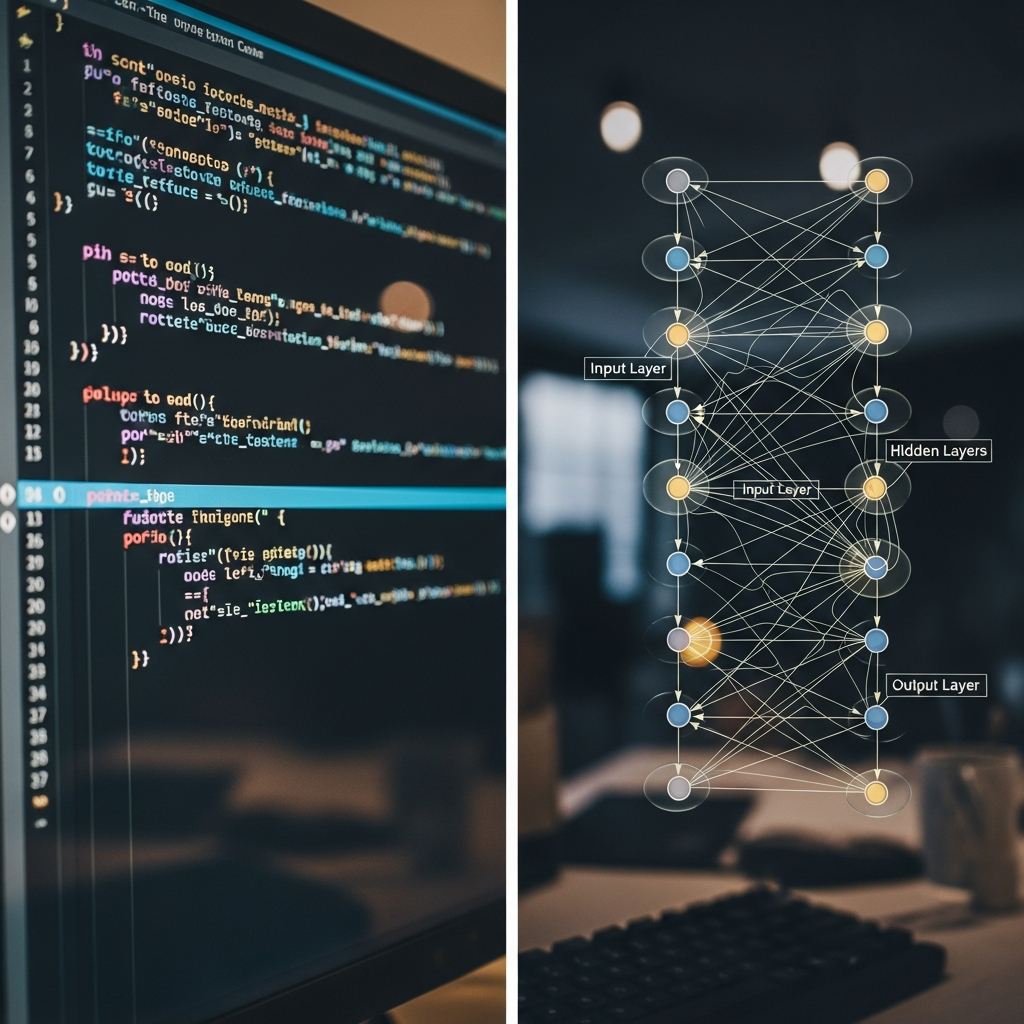 The big difference between artificial intelligence projects and regular software engineering is how they handle instructions. In a normal coding job, you write clear steps that tell the computer what to do. The code decides everything about how the program works. If you need to figure out sales tax, you make a function that multiplies the price by a set rate.
Machine learning projects work another way. They use data to learn how to do things. Instead of making rules, you give the system lots of data. The system then picks up patterns on its own. The way the model works depends on the data it gets, not what you write as instructions. This lets artificial intelligence systems take on jobs that would be hard to code, like understanding natural language prompts.
Using machine learning and artificial intelligence lets computers deal with things that change and be a bit unclear. This is much more than just following step-by-step rules you use in regular software engineering or coding. Now, language and the way people talk to machines can be handled better, thanks to data-driven learning.
Machine Learning vs. Traditional Coding: Key Differences
To better understand the differences, let's compare machine learning with traditional software development side-by-side. Traditional coding is deterministic, meaning the same input will always produce the same output. Machine learning, on the other hand, is probabilistic. It makes predictions based on patterns learned from data, which introduces a degree of uncertainty.
This difference fundamentally changes the development process. In traditional coding, the focus is on writing and debugging logic. In machine learning and deep learning, the focus shifts to collecting and cleaning data, selecting and training models, and evaluating their performance. The choice of programming languages also reflects this, with Python dominating the AI space.
Here is a simple breakdown of the key differences:
Feature | Traditional Coding | Machine Learning |
|---|---|---|
Logic | Explicitly programmed rules | Learned from data |
Approach | Deterministic | Probabilistic |
Core Task | Writing algorithms | Training models |
Data | Input to be processed | Used to train the system |
Outcome | A defined output | A prediction or decision |
Real-World Examples of Beginner-Friendly AI Projects
AI is everywhere. It’s in Netflix’s suggestions and the speech recognition in your phone. You can get many real-world AI project ideas just by looking at these features and making them simpler for beginners. This is a good way to practice and make something real.
You could make a small recommendation engine. Instead of a big system like Netflix, you can build a model that suggests movies based on how a user rates a few films. You can also use nlp to build a simple chatbot for answering common questions.
There are some real-world examples you can try for your own project:
Sentiment Analysis: Check customer reviews from a website. Find out if they are good or bad.
Image Classifier: Build a model to decide if a picture is of a cat or a dog.
Price Prediction: Guess the price of a house by looking at details like its size and place.
Spam Detector: Make a tool to sort emails as spam or not spam.
Tools and Resources Needed for AI Coding Practice
 To start with AI, you will need some good tools and resources. The good thing is, lots of the top tools for data science and AI are open and free to use. The main thing is to know one or two important programming languages well.
Besides knowing languages, you will also use libraries that help with hard tasks. There are platforms you can use to practice your coding skills. The right mix of these resources will help you learn the best ai coding in a way that feels easy. Here are some things you need to get going.
Popular Programming Languages for AI Projects
When you pick a language for your AI project, most developers choose Python. It is simple to use, so you learn it fast. Python also has many libraries made for AI and machine learning. This helps make the development process quicker.
Even though Python leads, you can use other languages too. Java is well-liked at big companies and comes with many machine learning libraries. JavaScript, using TensorFlow.js, lets you run AI models in the browser. That is good for web-based software development.
If you are new to software development, starting with Python is best.
Python: The number one language for AI thanks to how easy it is and the strong machine learning libraries.
R: Mostly chosen for jobs like statistical analysis or showing data.
Java: Works well for large business projects.
C++: Used when you need your AI application to be fast, such as game development.
Must-Have Libraries and Frameworks (NumPy, Pandas, Scikit-learn)
Programming languages are just the beginning when you start with machine learning. You also need libraries and frameworks to help with your AI projects. These tools give you code for common jobs, so you do not have to write everything yourself. If you use Python and you are a beginner, some libraries are must-haves.
NumPy is a key library for numbers in Python. It lets you work with big arrays and matrices. Pandas works with NumPy. It is made for data work and makes handling tables or spreadsheets very easy.
If you want to do machine learning, Scikit-learn is good for new users. It gives you simple tools for finding patterns and understanding data. These tools are great for AI coding if you are just starting out.
NumPy: For numbers and working with arrays.
Pandas: For data handling and looking at data.
Scikit-learn: For creating and teaching machine learning models.
Matplotlib/Seaborn: For showing your data in charts.
Best Online Platforms for AI Coding Practice and Challenges
To get better at coding, it can help to keep practicing. There are online platforms where you can try coding challenges with AI, machine learning, and data science. These are a lot like HackerRank, but they focus more on the best ai problems. They are the place to use what you learn on new tasks.
Kaggle is a top site for doing this. It runs machine learning contests using real-world data. You can join in, compete, and see how other people solve the same coding problems. Kaggle is known as one of the best ai coding practice sites out there. For more practice, you can use HackerRank or LeetCode, which also have sections just for machine learning and ai challenges.
Big cloud platforms such as AWS, google cloud, and microsoft azure provide tools as well. They give clear guides for anyone to try building ai apps. You can also look at GitHub for coding projects, which can help you learn more or work with others.
Kaggle: Great for competitions and finding real data.
HackerRank: Has coding contests and ai problems.
Analytics Vidhya: Gives hackathons and practice tasks.
DrivenData: Brings data science contests for doing social good.
Conclusion
To sum up, starting your first AI project is a big step and can help you grow and learn new skills. When you know what makes AI projects different, pick simple ideas to start with. Follow the steps in this guide. These things will help you build a great project for your developer portfolio. Start with small steps. Build your skills over time. As you go on, ask for help if you need it. Ready to move forward? Book a free talk to help you with your AI project.
Frequently Asked Questions
How many AI projects should I add to my portfolio as a fresher?
For beginners, it is better to have two or three good projects that are complete. These should be finished and clear. Do not have many projects that are not done. You need to show quality, not how much you can do. A good developer portfolio will show what you can do in software engineering. You should use different programming languages. Show your best ai coding work. This is important if you want a job in software engineering.
Where can I find open-source repositories and exercises for AI coding practice?
GitHub is a great place to check out artificial intelligence projects that are open-source. You can search for topics you like and look for a repo with clear documentation. OpenAI and Hugging Face are two groups that have many public repos that help you learn about artificial intelligence.
Is it important to know the history of AI before starting my first project?
You do not need to know the history of artificial intelligence before you start working on your first machine learning project. You can skip learning about things like artificial general intelligence at the beginning. It is better to focus on learning practical skills like coding and data analysis at first. As you get more interested in deep learning later on, you can read about the history of artificial intelligence.