







.png%3Falt%3Dmedia%26token%3D05b8437d-6bdc-4bbb-ae56-acaedd9a5b88&w=3840&q=75)
. How to Integrate Artificial Intelligence in Your Workflow
Key Highlights
Artificial intelligence helps you handle routine work faster and improve productivity.
You can start small with workflow integration in writing, meetings, search, and coding.
Machine learning, deep learning, and language tools each support different work needs.
Generative ai tools can help with text, image generation, summaries, and code generation.
Many beginner-friendly options offer a free plan, open source access, or a free tier.
The best results come when you pair AI systems with human review and clear goals.
Introduction
Artificial intelligence is not just for big tech teams now. You can use it each day in your work. It can help you write quicker, search better, set up meetings, and cut down on repetitive tasks. Good use of AI in workflow does not mean taking the place of people. It means picking the right tools to help you make choices and get more done. If you do not have much experience with AI, this guide will help you learn the basics. You can see how to compare your options and follow easy steps to add AI to what you do each day with confidence.
Understanding Artificial Intelligence and Workflow Integration
 Artificial intelligence is when ai systems are made to do jobs that people usually do with their minds. This can be things like writing, putting data in order, answering questions, or seeing patterns in large amounts of data. The use of ai is getting bigger now because it lets people save time and make better choices.
When you talk about a workflow, integration is how you put AI into the steps you already have. You do not have to start from nothing. You just add AI where it helps the most. The next parts will go over what AI is, why it matters, and how these common tools work.
What is Artificial Intelligence?
At its heart, artificial intelligence is about creating ways for computers to finish jobs that use human intelligence. These jobs can be things like understanding words, making new text, seeing patterns, and giving advice. An ai model learns to answer by using examples, rules, or both.
The main idea is not new. People have asked questions about computing machinery and if a machine can think since the days of Alan Turing. Now, AI is much more useful. This is because we have better hardware, more data, and smarter ai models. These things help us use AI in our daily jobs.
Why do we need AI tools? They help by cutting down on manual work and making usual tasks faster. Each type of ai tool has its own focus. Some are for text, some for search, and some work with code or images. This gives you many ways to do work better but still stay in control.
Why AI Matters in Modern Workflows
Modern teams often spend time on small, repetitive tasks all day. These can be things like taking notes, writing emails, making summaries, or looking for files. When you use workflow integration, an ai assistant can handle some of this routine work. This can help you get things done faster.
There are many ways you can use the applications of ai in tools people already know. For example, meeting assistants like Otter.ai can record talks and give you call summaries. Search tools like Perplexity AI help you find answers in less time. Writing assistants can help you write drafts, and coding tools can suggest ways to fix your code.
This matters because you become more productive when you do not waste hours on repetitive tasks. For your day-to-day life or your business, an ai assistant can also make customer service, research, content creation, scheduling, and going over documents much easier. When you use it well, it fits right into the way you already work and gives you good support.
Overview of AI Tools and Their Functionality
AI tools are software powered by ai systems. They help people with specific tasks. Some tools let you ask questions in a chat. Others will summarize files, create images, translate speech, or do code generation. Each one of these tools has a clear use.
Many of the tools work when you give them your input, usually in simple language. The tool sends your message to a trained model. The model then looks at large amounts of data it has learned from, and predicts a useful answer. So, what you tell the tool, your context, and the settings all matter a lot.
Some tools have advanced features. These include things like chatting with documents, doing workflow automation, using the tool on your own device, or working with a team. For example, ChatPDF can work with many files. GitHub Copilot helps you write code inside editors. Stable Diffusion lets you do image generation, and does this well. These tools together help make ai systems seem useful in your daily life and not just an idea.
AI Basics for Beginners
 If you are new at this, keep the basics of AI simple. Artificial intelligence is a big area. Machine learning is a subset of artificial intelligence, not the other way around. Deep learning is a more advanced part inside machine learning. Each of these areas help people solve different problems.
You do not have to know every important term right away. Begin by learning the main ideas, the types of AI, and some simple words you see in tools. This will make the next parts much easier to follow.
The Core Concepts Behind AI
One good way to get the idea of an ai model is to think about how it predicts things. The ai model looks at patterns in a lot of data and then gives an answer. The answer can be a sentence, a picture, a code suggestion, or a way to order things. The system gets better at this as it learns from examples.
This way of thinking is tied to early ideas about how computing machinery works and how machines act. Alan Turing started this talk by asking when a machine might seem to think like people. Today, the models do not think the way people do, but they can do certain jobs very well.
Why should you care about this? It is important because these modern tools use large amounts of data to learn and act in new ways. That is what makes ai models important. They help you work faster, keep things in order, and get things done that would take most people a long time to do by hand.
Types of AI Explained
There is more than one type of ai, and this difference is important. The kind you see most often is narrow ai. These ai systems are made to do focused jobs. This can be writing, search, translation, transcription, or code completion. They do their one area well.
Artificial general intelligence is the idea of a system that can do many jobs, much like people do. It is talked about a lot, but most ai systems you use now are narrow ones built for specific, clear jobs.
Yes, the different types of ai use different tools. A writing helper is not the same as an image model. A coding helper is different from a meeting bot. When you know if a tool is for text, speech, or automation, you get the right one. This helps you waste less time.
Key Terms to Know in Artificial Intelligence
Before you start to use AI every day, it is good to know a few easy terms. You will see these words on product pages, in setup screens, and in learning guides. When you get these terms, it gets a lot easier to compare tools.
Here are a few key terms you will see:
AI model: the trained system that gives you an answer, a tip, or a guess
Large language models: these are focused on text and show up in chat, writing, and search tools
Data science: the work of looking at data to find patterns and help make choices
Programming languages: examples are Python, and these are used for software development and AI coding
Open source: this means tools or ai model that you can check, change, or run on your own
These terms matter because they show how AI works for you. The idea is simple. A tool uses a trained model to turn your input into useful output. That is what makes AI tools good for real work.
Common Misconceptions About AI
Many people think that AI works like the human brain. It does not. Even the strong systems are tools made to do simple, pattern-based tasks. They might sound smart. But that is not the same as full human intelligence. You still need to use good judgment and check the answers.
Some believe all AI is the same. Machine learning, deep learning, and generative ai are related. But they are not all the same. Some tools can help sort information. Some can make text or photos. Others help with search, coding, or taking notes in meetings.
People may also think one tool can do everything. This is not true. Every type of artificial intelligence uses its own tool for different work. Stable Diffusion is for images. GitHub Copilot helps with code. Otter.ai works for meetings. You have to match the right tool to the task for real value.
Exploring Different Types of AI
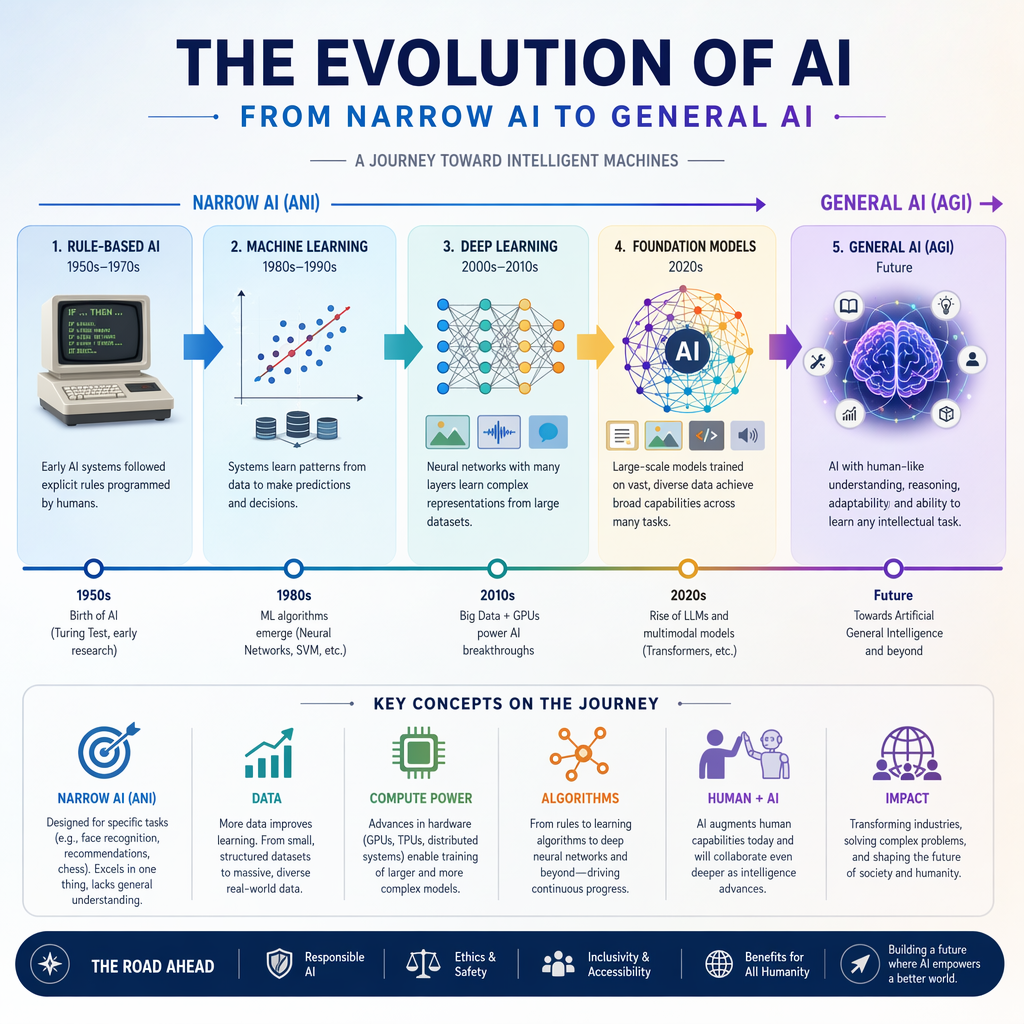 Artificial intelligence is made up of a few main branches. Each branch helps with a different kind of job. If you know the type of ai a tool uses, you can guess what it does best and what may be hard for it.
For daily use, the most useful type of ai are machine learning, deep learning, natural language processing, and generative tools. The next parts will look at these areas in a simple way. This helps you see how they fit into real workflow needs.
Narrow AI vs General AI
Most of the tools you use right now are what they call narrow ai systems. These are made to do specific tasks. For example, some help you sum up a meeting, answer questions from one document, write marketing ideas, or help you with code in an editor. They are good in their own area, but they do not do everything.
Artificial general intelligence is something much bigger. This is about a system that could learn and do a lot of tasks, almost like people do. The products you see in the list are strong, but all of them still stick to a few things like writing, search, design, or coding.
Knowing this difference can help you get the right tool. If you need help finding things in a document, use a document assistant. If you want help with code, go for a code tool. People use different tools for different jobs because all products are built for a certain thing, not everything at once.
Machine Learning
Machine learning is a big part of AI. It helps machines find patterns in data and not just follow fixed rules. This is why you see machine learning used in search, making recommendations, coding help, ranking, and doing data analysis.
People talk a lot about supervised learning and unsupervised learning. To put it simply, one learns from examples that are labeled, and the other tries to see patterns when there are no clear labels. You will see both of these used to help tools put information in order and make guesses better.
Why does it matter? The answer is many things you use every day depend on machine learning. Email helpers, smart ways to search, workflow tools, and bots for customer service all use it. This lets your software change and help you with less hands-on work from you.
Deep Learning
Deep learning is a big part of machine learning. It uses neural networks to find hard patterns in text, images, audio, and code. Many of today’s AI tools work with deep learning.
These systems need large amounts of data to work well. This is why new tools are better now. When data and model size got bigger, the results got better in writing, image generation, speech recognition, and helping with code.
For you, this is helpful in real life. A deep learning ai model can change a text prompt into an image, make a short version of a long file, or help with code. This makes AI tools good because they save time and make hard things easier to do.
Natural Language Processing (NLP)
Natural language processing helps computers understand and work with human language. It lets machines read text, write in a conversational way, answer questions, translate words, and give summaries. Many chat tools, writing helpers, and document bots use this part of AI to help you.
Language models are important in natural language processing. These models learn from lots of text to guess what words should come next. This is how a chat assistant can answer a prompt, talk about a document, or help you write an email. Tools for machine translation and making summaries are also built with natural language processing.
This is useful because so much of our work is about text. You get emails, check over reports, search for info, and share updates every day. Natural language processing lets AI help out with these jobs. It can save people time and make work more steady, as long as you still read and check everything it does.
Generative AI Tools
Generative ai tools use your input to make something new. You type in text prompts, and the tool gives you text, code, images, audio, or even video as output. This is different from tools that can only sort or find information.
For example, you can use ChatGPT to write text. OpenAI Codex is there for code generation, and Stable Diffusion helps with image generation using tools like DreamStudio. Canva and Playground AI let people who are not designers create visuals. With these products, you give a prompt, and they make a new result for you.
How does it happen? These generative ai tools use models trained on past data. When you make a request, the system looks for patterns from what it learned before. Then it predicts what output fits your prompt. This is why the words you use matter. If you give clear text prompts, you get better and more useful results from the ai.
Popular AI Tools for Workflow Enhancement
 There are now many ai tools out there. But you do not have to check each one. It is better to pick tools that fit with what you do every day at work. Some tools do well for writing, some help with coding, and others work for meetings, searching, or work files.
The best ai choices for making your day-to-day work better have a good mix of being easy to use and having advanced features. In the next parts, you will see ai options that are simple for new users. You will also see tools that help students and working people. There will even be an easy table to compare them, so you can pick the right one fast.
Best Free AI Tools for Beginners
If you are new to AI, you should start with simple products. Look for ones that give you a free plan. Make sure they have clear use cases and do not take much work to set up. You want ai tools that you can try for real tasks without making things hard to get. The list put together here gives you some good beginner options.
Good free tools to start with are:
ChatGPT for general writing, for getting help with ideas, and for support when you ask questions
Perplexity AI for search and for getting quick answers with a simple look and feel
Notion AI helps you with notes, docs, and fast workflow support in a workspace
Ollama or gpt4all if you want open source options or want to try using these ai models on your own
People often say these are among the best ai tools for beginners. This is because they do what most people need. They help with writing, search, summaries, or just trying things out. Try starting with one or two of these free tools, not many at once. That will help you learn better and keep your work steady.
Reliable AI Tools for Students and Professionals
Students and people at work often need help with reading things, writing, meetings, and getting project work done. The best tools on this list are trusted, simple to use, and work well across many subjects and jobs. A few options stand out the most from our list.
Helpful choices include:
GitHub Copilot for fast coding help and quicker development work
Otter.ai to get notes, summaries, and action items from meetings
ChatPDF or SciSpace for reading and making sense of long files
Notion AI to put notes, drafts, and your work plans in order
These ai tools are good picks because the tools match real school and work needs. Students can use them for study help and research. People who work can use them as virtual assistants for writing, meetings, and keeping track of work. Choose one tool for your main problem first. Later, you can add more as needed.
Comparison of Top AI Tools and Features
Top AI tools differ in focus, ease of use, and advanced features. Some are broad assistants, while others are built for one task like coding, search, or file chat. Looking at use cases makes comparison much easier than chasing brand hype.
Here is a simple text table:
Tool | Main Use | Ease of Use | Advanced Features | Free Tier |
|---|---|---|---|---|
ChatGPT | writing, chat, idea support | very easy | broad text help | yes |
Perplexity AI | search and answers | easy | research-style search | yes |
GitHub Copilot | coding support | moderate | code completion, code help | limited |
Notion AI | docs and notes | easy | in-workspace writing help | limited |
Otter.ai | meetings | easy | transcription, summaries | yes |
Stable Diffusion tools | image creation | moderate | flexible image generation | varies |
If you ask how the top AI tools compare, the simple answer is this: choose by task first, then by interface, then by budget. That keeps selection practical.
User-Friendly AI Tools for Everyday Tasks
The easiest AI wins usually come from the small things. You do not need a big, complex platform to get real value. There are user-friendly tools that help you draft messages, summarize files, organize notes, or catch what was said in meetings. You can do all this without needing to change your whole system.
Here are some simple, everyday examples:
Compose AI speeds up your writing using AI-powered autocompletion.
DeepL Write makes your writing better and more clear.
Otter.ai records and gives you summaries of your meetings, so you do not miss details.
These AI tools make it easy to bring them into your daily work. They help by taking away repetitive tasks, which boosts productivity. You do not need lots of training. You can keep doing your job and let the tool handle the first draft, the summary, or making a transcript. That is usually the fastest way to get the most out of AI.
Applications of AI in Daily Life and Business
 AI is already in our daily lives and work, even if people do not always call it that. You can find it in search, tools that help you write, meeting notes, chat support, design programs, coding help, and research platforms. These applications of ai are very much in use right now and not something far off in the future.
For businesses, the big value comes from speed and being able to do things the same way every time. For people, AI is useful because it makes life easier and helps us get more done. The next parts explain how AI helps with automation, analysis, marketing, creative work, and learning.
AI in Productivity and Automation
One of the top ways you can use AI is to help with work and save time. Many tools can help by handling repetitive tasks like writing meeting briefs, making draft answers, sorting notes, or keeping files in order. With this kind of help, you get to spend more time making choices and less time on small, daily actions.
There are products out there such as Taskade, Nekton AI, TailorTask, and Emilio. These tools show how an ai assistant can help you. They handle workflows for you, keep your tasks in line, and save you from having an email inbox that piles up. In both work and life, even small gains like taking notes faster or getting a quick update on your files can give you back a lot of time each week.
Teams in business also use AI for customer service. You will see tools like SiteGPT, SiteSpeakAI, and Twig offering faster answers and help all day, all night. So, both at work and with things you do on your own, an ai assistant can help with what can be done again and again. It lets you make the big choice in the end.
AI for Data Analysis and Decision Making
AI helps when there is a lot of information to handle. In data analysis, tools can look through large amounts of data, spot patterns, and turn numbers into simple answers. This lets people make decisions faster.
The list has tools like MinusX and Excelmatic. These help users ask questions about data and turn files into useful insights and easy visuals. Search and research tools like Consensus, Elicit, and NotebookLM help people go through complex details much faster.
This is important because business choices often use big data, not just what people think. An ai model can show trends, sum up results, or point to good choices. You still check the results yourself, but the system saves time so you can get to answers faster.
AI Tools in Marketing and Customer Support
Marketing teams use AI tools to help with content, get better targeting, and make campaign work faster. The list shows tools like Jasper AI, Anyword, Smartly.io, Phrasee, and Taplio. These tools help with blogs, ads, email copy, and planning posts on social media.
Customer service teams use AI to respond faster and give more support. Tools like SiteGPT, GPTHelp.ai, Dear AI, and Inline Help are there to answer common questions and support users when they need help. This can make response times quicker and take stress off your people.
Using natural language prompts makes these AI tools simple to use. You just say what you need, and the tool gives you words, answers, or ideas. That is why AI works well in both marketing and customer service. It lets teams do the same kind of talking many times, but faster and in a more organized way.
AI for Creative Content Generation
Generative ai has changed the way people make creative content. Now, you can use text prompts to get blog drafts, ad copy, artwork, videos, voiceovers, or even code suggestions. This makes it much faster to test out ideas compared to older ways of working.
The information you see here covers tools that work in many different formats. Stable Diffusion, DALL·E 2, Midjourney, and Canva can help you with image generation. Synthesia and RunwayML can be used for video creation. If you need code generation, OpenAI Codex and github copilot are great choices. Murf AI and ElevenLabs make it easy to get voice output, too.
These tools do not take your place. They simply give you a faster and better way to start. You still decide how the final result will look. You change the tone and check the quality. If you use generative tools well, you can go from an idea to a draft with less trouble and more chances to try new things.
AI in Education and Research
In education, AI tools help students read faster. They help make hard material easier to understand. These tools also help people organize study notes and work. In research, AI makes it easy to check papers, understand what is written, and search for facts. This way, big reading tasks do not feel so hard.
The list has Elicit, Explainpaper, Consensus, SciSpace, and NotebookLM for help with research. These tools help you understand research, find what you need in science work, and even chat with your papers. Students can also use writing tools and note apps. These make it simple to put ideas in order and see them more clearly.
Creative and tech learning get support too. Stable Diffusion lets you try new things with images. OpenAI Codex and GitHub Copilot help you learn how to code. These make coding easier to get and see patterns. All of these tools do more than make work faster. They give you clear paths to learn, help you find answers, and guide you as you explore new ideas.
Getting Started with AI Integration: Beginner’s Guide
 It can seem hard to start with ai integration, but it gets simple when you look at one workflow problem at a time. It's best for people new to this to try one or two ai tools with a real daily task. Don't try to use every new app you see.
At first, learn the basic ideas of AI. After that, set a clear goal. This could be to write faster, improve your meeting notes, or make research easier. The next parts will talk about what you need, what tools are helpful, and where to find learning resources you can trust.
What You Need to Begin Integrating AI
You do not need a big setup to get going. You just need a clear task, internet access, and one or two ai tools that help solve a real problem. For your first test, a writing assistant, a meeting tool, or a search product works well. Start small.
Workflow integration is best if you pick a task you do again and again. You might sum up calls, answer simple questions, or write social posts each day. In this case, an ai assistant will get into that part of the work with not much trouble.
For learning, use key resources from trusted lists and the tool’s official pages. Try out the product, read the setup guide, and check how well it does the job. This use of ai helps you learn faster than just reading because you see the result in your own work.
Essential Equipment and Resources
For most beginners, you just need a laptop, a web browser, and a steady internet link. Many AI tools work on the web, so you will not need any special hardware. If you want to run tools on your own computer, there are options like Ollama for that.
The tools you use should fit your goal. If you need to improve writing, choose text tools. For help with coding or software development, go with tools such as github copilot or other products built from openai codex. If you want to work with pictures, try using stable diffusion apps or Canva.
If you want to go further, it is good to know some basic programming languages. Python comes up a lot when people talk about learning plans. Still, you do not have to code before you begin to use AI tools. Try things out first, then learn the tech side a little at a time.
Trusted Educational Resources and Courses
If you want the best learning tools, it’s good to start with the ones in the list. These tools are well-known and easy for beginners. They will help you learn about AI tools without feeling lost. Good teaching makes it simple to see how ideas work in real life.
Here are some helpful places to start:
Learn Prompting and Prompt Engineering Guide. These will help you write better prompts.
OpenAI Cookbook gives you easy examples and guides for using different AI tools and APIs.
Machine Learning Roadmap, Fast.ai, and lessons by Andrew Ng can help give you a plan for learning.
If you want to go to classes in your area, you can check out centers like SocialPrachar at https://www.socialprachar.com. There are many people who look for ai courses in hyderabad, ai engineering course in hyderabad, generative ai course in hyderabad, data science course in hyderabad, ai training institute in hyderabad, ai developer course in hyderabad, ai engineering institute in hyderabad, and machine learning course in hyderabad when they want someone to guide them while learning.
Using these starting points can help you learn more about machine learning, generative ai, and data science.
Step-by-Step Guide to Integrating AI in Your Workflow
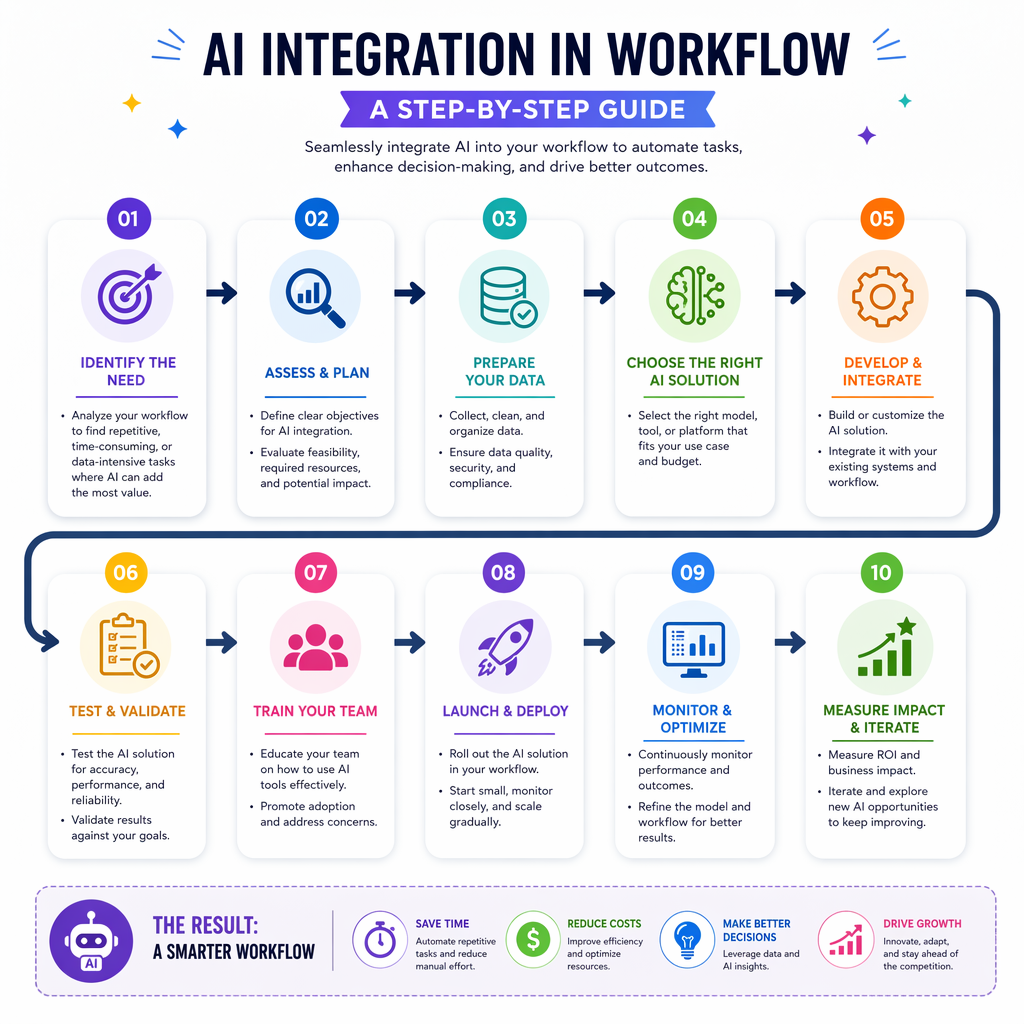 A strong AI integration plan should be clear and stay focused. You do not have to use every tool or bring in every department right away. It is better to start with one workflow, one problem, and one result that you want to make better. This way, the process is clear and easy to track.
This step-by-step guide shows you the basics, like how to look for useful use cases. It helps you pick the right tools, set them up, start using them, and then keep improving them as time goes on. If you stay practical, you will make progress faster.
Step 1: Identify Your Workflow Needs
First, take a close look at your workflow. Find out where you spend too much time. Check which jobs feel the same every day, take long, or are simple to do again and again. The best AI use cases are in things like note-taking, search, writing drafts, talking to customers, coding help, or basic data analysis.
After that, write down the specific tasks you want to make better. Do not just say, “I want AI everywhere.” Instead, be clear, like saying, “I want meeting notes to be ready faster,” or “I need help with common support questions.” When you know the task, the next step becomes much easier.
AI tools make workflow tasks easier when there is a real need. Your results will be better if you focus first on one problem. After you see what you need, test a small fix. Then see how much time you save and think if you want to use it in more areas.
Step 2: Choose the Right AI Tools
First, find out what problem you want to solve. Then pick ai tools that fit that need. For writing, you can use ChatGPT, Notion AI, or Compose AI. For research work, Perplexity AI or Elicit can help. When you want to code, GitHub Copilot is a good choice.
If you are new, pick tools with a free plan or a free tier. This way, you can try them out first. There is less risk, and you can see their value before you pay. The best ai is not always the most known one. It is the one that fixes your work problem in the best way.
You should also think about real applications of ai in your team. Will the tool work well with your documents, meetings, or the way you handle customer support? A good tool will fit easy, and feel right. The wrong tool will give you more work. So, keep things simple and choose based on your task.
Step 3: Setup and Configuration
After you pick a tool, start with the setup. Most beginner products are simple. You need to make an account. Then, connect your workspace or file source. Try out one task to see how it works. Some tools are made for people who use programming languages. These may need extra steps like editor plugins, local models, or API settings.
Basic setup often includes:
connecting documents, meeting apps, or your browser workflow
choosing permissions, default prompts, and output style
turning on advanced features like summaries, automations, or integrations
You can find tools that only work in a browser. Some sit inside programs like VS Code to help with coding. For local setups, you may need to use programming languages or a terminal. Most tools, in the end, take your input. They use a model and send you a useful answer for your task.
Step 4: Implement AI Solutions
Now is the time to use the tool in your real work. Start with one task, not many. For example, you can pick a meeting assistant for all your team calls this week. Or, try one writing assistant for all your first drafts in a content cycle.
Keep the first step simple. If you are in software development, use a coding assistant just for writing docs or giving test ideas at first. If you use ai agents or automation tools, start with one approved task and check every result very closely.
You will learn the most by using AI in daily work. That is the best way to get going with online tools. Test the tool, check what comes out, improve it, and do it all over again. When you see that the first try goes well, add another tool. That way, more people start using the tools without things getting mixed up.
Step 5: Monitor and Optimize Usage
The last thing you need to do is watch how the tool works every day. Is it helping you save time? Do you think the work it does is good enough? Does it help you do less by hand, or does it make you check work even more? You need to look at the tool in action for real before you trust it. This is better than just trusting new tech because it is new.
Next, do some easy data analysis. You can check how much time you are saving. You can see how fast the tool answers, how good the tool’s summaries are, or how much people use the tool. This will help you see if you should keep using the tool, make changes, or try a new one.
After that, make things better. Change the prompts, fix some settings, or focus the tool on a smaller job if needed. Most of the time, AI tools do the job better if you help them work right and keep trying to make things better. Making small changes is often a better way to improve results than switching to a whole new tool. Always learn from how you use the tool in real work.
Conclusion
Adding artificial intelligence to the way you work can help you get more done in less time. When you learn about the different kinds of AI and how to use them, you can find the right tools for your own work. You can use AI to handle simple tasks or to help you make choices based on data. There are many good things about using AI this way. AI can take care of everyday jobs, so you have more time to work on big ideas and plans. When you start using AI, it’s smart to look for help and information too. If you want to see how AI can change your work for the better, you can book a free consultation with our experts today!
Frequently Asked Questions
Which AI tools are best for beginners in India?
Good beginner AI tools to try are ChatGPT, Perplexity AI, Notion AI, and Otter.ai. These tools be simple to use, and they help with many common jobs. Many of them have a free plan or free tier, so you can test them before you spend money. If you want more control right on your own computer, you can go for open source tools like Ollama or gpt4all. They are also worth checking out.
How do AI tools simplify workflow tasks?
AI tools help you work better because they take care of repetitive tasks. Some of these are writing summaries, capturing notes, making first drafts, searching, and doing simple jobs. This saves you time and makes it easy to get more done. You still need to check the final result, but the tool takes away the slow part at the start of your work.
Where can I find trustworthy AI educational resources?
Start with educational resources you find in lists like Learn Prompting, Prompt Engineering Guide, OpenAI Cookbook, Fast.ai, and machine learning roadmaps. These courses and guides help people who are new, developers, and data scientists get good skills. They also let you try out open source tools.
What are some practical examples of AI integration in business?
Businesses use ai in many ways. One common use is an ai assistant that helps with meeting notes. Some tools can also write drafts for marketing. There are chat options that give customer service. There are also tools to speed up data analysis. These applications of ai help teams do less manual work. This way, they can answer faster and get more done.