







.png%3Falt%3Dmedia%26token%3D68b80aa3-1a8e-49fc-b789-c89b2ae24295&w=3840&q=75)
Why Your Business Needs a Modern Data Stack Now
What happened to modern data stack? : r/dataengineering
The modern data stack has evolved significantly, integrating advanced tools and technologies to enhance data management and analytics. It combines cloud storage, ETL processes, and BI tools, enabling businesses to leverage real-time insights efficiently. This transformation empowers organizations to make data-driven decisions faster than ever before.
Key Highlights
A modern data stack uses cloud-based tools to collect, store, clean, transform, and analyze data from various sources.
Unlike a traditional data stack, it supports better scalability, faster data processing, and more flexible data architecture.
Core components include data pipelines, ingestion tools, storage, transformation tools, orchestration tools, and bi tools.
Platforms such as Snowflake, dbt, Airflow, Tableau, Power BI, and Google BigQuery play important roles.
Businesses adopt modern stack systems for real time insights, stronger data governance, and better AI analytics outcomes.
Moving from legacy systems helps reduce data silos and improves data access for business users.
Introduction
If you need to make fast decisions in your business, the data stack you use is very important now. A modern data way can help you change the way you handle all the data you get. It turns bits and pieces into clear business intelligence. Old systems slow you down, but with new tools, you do not have those limits. You do not have to wait for slow reports. You will have a system that is all about speed, being flexible, and able to help you grow. This is why many teams choose a modern data stack today. It gives you what you need to connect your tools, make better reports, and pick the right steps with fewer problems in your business life.
Understanding the Modern Data Stack
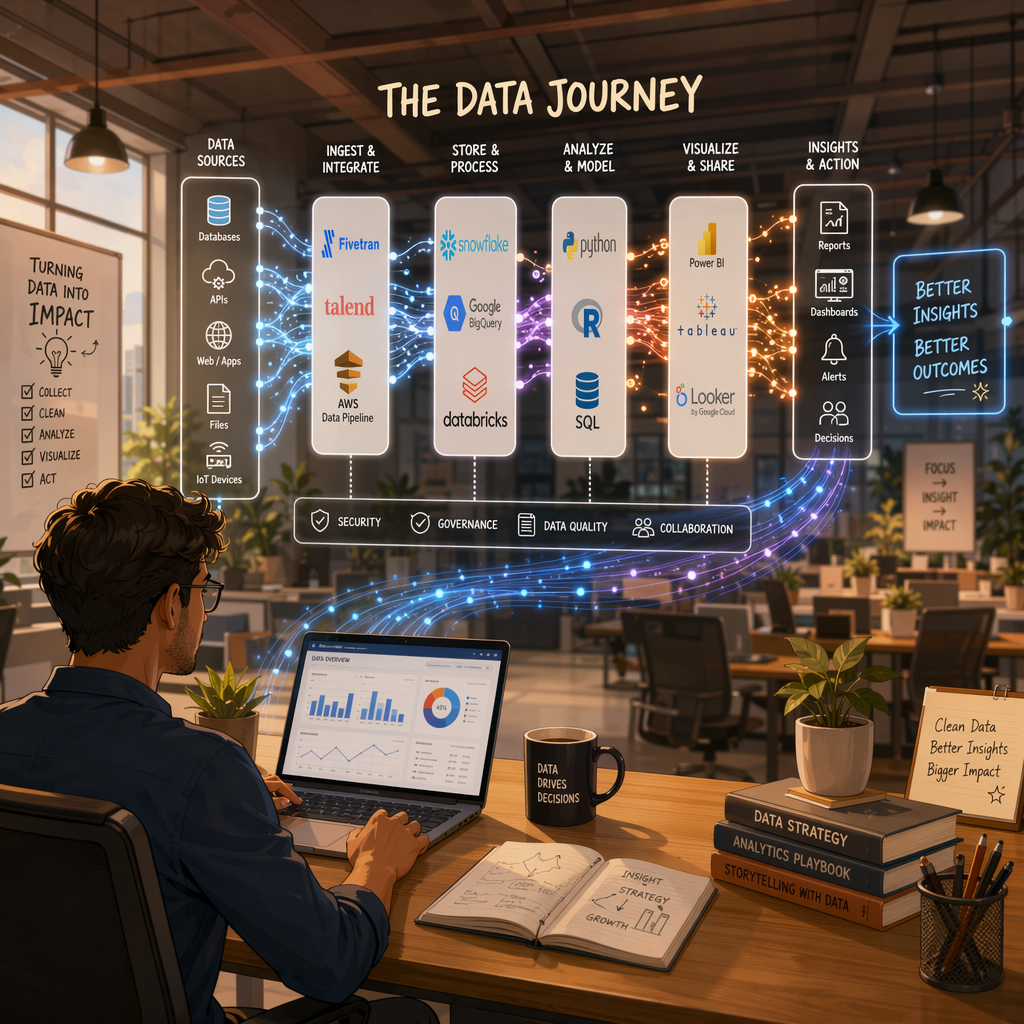 A modern data stack is a set of cloud tools that help with data integration, data processing, storage, transformation, analysis, and governance. This stack gives your business a more flexible way to handle data than a traditional data stack.
A traditional data stack usually needs a fixed setup at your place of work and more hands-on work. This setup makes it tough to grow and slows down use cases that depend on real time data. To see why this change matters, it's good to look at the main ideas, the differences, and what older data models can't do. The evolution of the modern data stack is being shaped by key trends such as the shift to cloud-based solutions, the increased focus on scalability, the use of real time data processing, and the adoption of automation and self-service analytics tools. These trends are driving organizations to move away from older data models, enabling more flexible, efficient, and faster decision-making while supporting a wider range of use cases.
Definition and Core Principles
A modern data stack is a group of cloud tools that work together. They help you collect, bring in, keep, clean, change, study, and manage data. To put it simply, it is a way to set up your data so raw data from different places turns into something useful for the business.
The data stack is built in layers. The main components of a modern data stack are data integration, storage, transformation, business intelligence, and observability. Each layer has its own job, but they all work as one system.
The main good things about this model are how it uses automation, gives you more choice, and opens up access. You do not have to use just one platform. You get to pick and hook up the tools that match what you want to do. That helps the data teams and business users work with modern data. It also keeps data quality high, and gives support for analytics and AI for everyone who needs it, even as you grow.
Modern vs Traditional Data Architecture
The biggest difference between a modern data stack and a traditional data stack is how they start. Legacy systems run on physical servers and stay the same over time. The modern stack is built in the cloud. This way, it can grow or shrink as you need it to.
There is also a big change in how data flow happens. The older way uses ETL. This means data gets changed before it gets to the data warehouse. In new systems, you will find ELT is more common. Data first goes in, then you change it after. This makes everything more flexible.
Modern tools are also built in smaller parts. You do not have to use just one platform for all the steps. With this kind of stack, you can easily use new storage, orchestration, and analytics tools together. Compared to legacy systems, this way helps you get real time answers, faster reporting, and better support for structured and unstructured data.
Why Legacy Approaches Fall Short
Many legacy systems were made for a time when there was less data. The reporting needs were also simple then. Now, businesses work with more channels, more users, and many types of data. These old platforms often find it hard to keep up with these changes.
One big problem with legacy systems is data silos. The systems do not connect well, so teams may not trust the data they see. This hurts data quality, makes data processing slow, and stops teams from getting a clear view of the whole business. You will also see slow updates and limited access in these setups.
Governance is also a problem. Old systems rely on manual controls and custom work. This takes more time and brings more risk. A modern setup will fix data governance, add automation, and let teams work with reliable data. This way, your teams are not stuck dealing with the limits of an old system.
Key Components of a Modern Data Stack
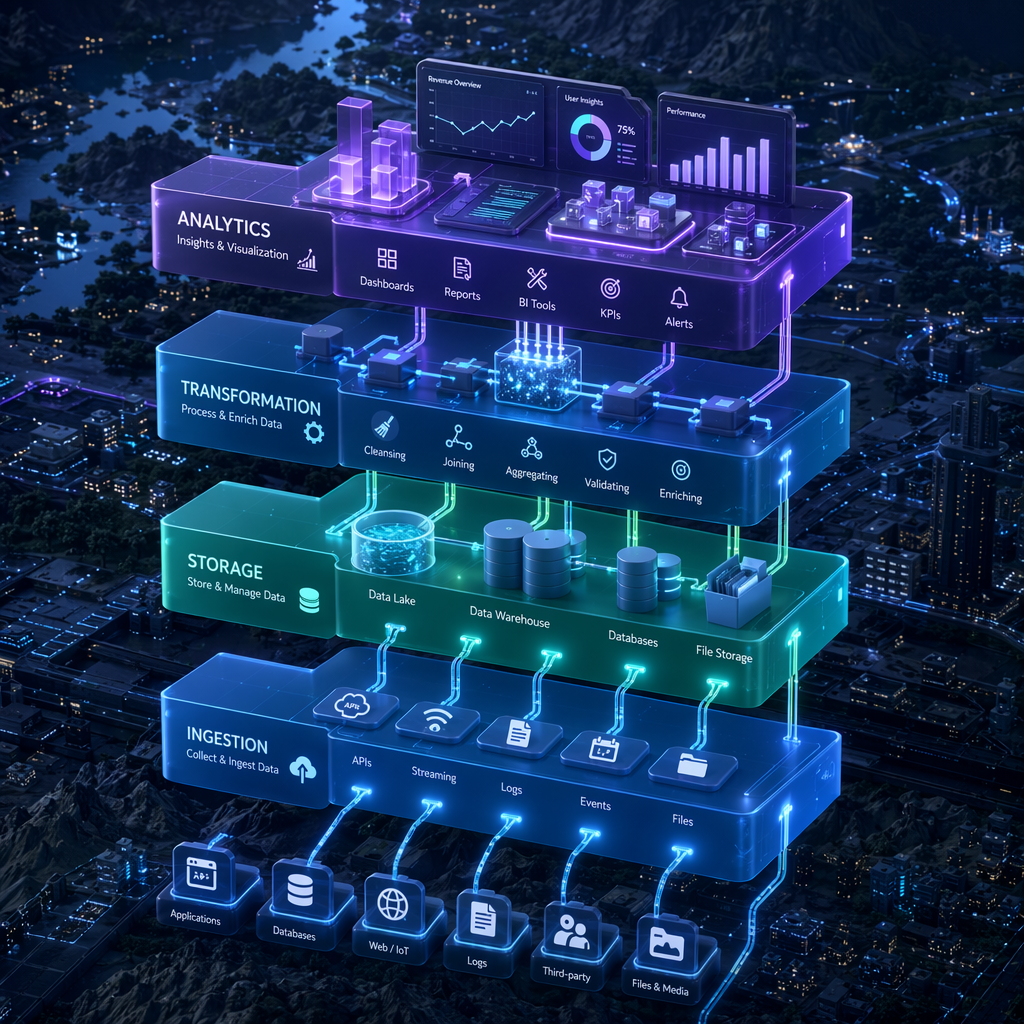 Every strong data stack is made up of a few core components. These parts take care of moving data, from when you get it until you report on it. Most of the time, these pieces are data pipelines, ingestion tools, data storage, tools to change data, ways to organize it all, ways to look at data, and tools for watching everything.
When you put these layers together, the system is easier to manage and grow. You can add new data sources, move data faster, and help teams make good choices. Let’s look at each part of the data stack to see how the full setup works.
Data Sources and Ingestion Tools
The first thing to do in a modern stack is get data from many sources. These sources can be apps, databases, marketing platforms, product systems, APIs, and event streams. Good data integration starts with this step. If you get poor data here, it can cause big problems later.
Ingestion tools help move data into one main place. You can use these tools for batch jobs or real time data, based on what you need. People use tools like Fivetran, Stitch, and Airflow to speed up data flow, bring in new data sources, and cut back on doing things by hand.
Here are some common ingestion tasks:
Getting data from various sources at a set time
Putting this data into cloud storage or a warehouse
Watching this movement so small errors do not mess up the next steps
When this layer runs well, your teams can spend less time fixing things and more time using the data.
Storage Solutions – Snowflake and Alternatives
Once data is collected, it needs a reliable home. Storage solutions in a modern environment usually include a cloud data warehouse, a data lake, or a data lakehouse. The right choice depends on whether you work mostly with structured records, raw files, or both.
Snowflake is one of the best-known options in this space, but it is not the only one. Google BigQuery and Amazon Redshift are also common choices for analytics workloads. Data lakes built on cloud object storage are often used when you need to store data in many formats at large scale.
Storage option | Best fit |
|---|---|
Snowflake | A flexible cloud data warehouse for analytics, AI, and scalable reporting |
Google BigQuery | A cloud data warehouse suited for large query workloads and fast analysis |
Amazon Redshift | A strong option for warehouse-based analytics and business reporting |
Data lake | Best for raw, structured, and unstructured data at very large scale |
Data lakehouse | Blends data lake scale with data warehouse query capabilities |
Transformation with dbt and Data Modeling
Raw data is usually not ready to use for reports. Many times, it has mistakes, double entries, things missing, or information stored in different ways. Because of this, data transformation is needed for you to trust your data. It gets data set to use for analysis and helps make reporting more solid.
One tool that people use a lot here is dbt. This tool lets the team work with changes done through SQL inside the data warehouse. With dbt, you can set up steps you use again and again, explain your rules, and keep your data work clear and in good order.
Working with data at this stage helps with data quality. Teams create steps to fix the data, get fields in the same format, join data sets, and make tables that you can count on. When you use better data processing here, you find less mistakes later. For your company, this means you trust your dashboards, your data measures, and your machine learning results more.
Orchestration Using Airflow
A modern stack has a lot of parts that all need to work together, so timing is important. Data orchestration helps you control when jobs run, what jobs depend on others, and how to handle problems. Without orchestration, your data pipelines can get out of control and be hard to trust.
Airflow is one of the top tools to help with this. It lets data engineers lay out the steps, set schedules, and keep an eye on everything in the data stack. Instead of running jobs by hand, teams use Airflow to automate things like taking in data, changing it, and the other steps involved.
This setup makes sure the process is more reliable and saves time. If a workflow step fails, teams can spot the problem fast and fix it before it messes up any reporting. For those who want updates all the time or need things done in real time, Airflow keeps the data pipeline stable and helps the modern stack work well.
BI, Visualization, and Analytics Platforms
After you store and process data, you need to use it in ways that help your work. This is where bi tools and analytics platforms come in. They take big, confusing tables and turn them into dashboards, reports, and trends. People in any part of the company can look at these and understand what is going on.
The most popular business intelligence tools are Tableau, Power BI, and Looker. These tools make data visualization and data analysis easy. Teams use them to find patterns, watch performance, and answer business questions fast. Bi tools also let people who are not tech experts work with data in new ways.
These tools often help you:
Build dashboards for teams and leaders
Spot trends, problems, and changes in performance
Take your numbers and turn them into actionable insights you can use every day
When everyone can get to business intelligence, your teams make good business decisions faster and with more trust.
Tools Powering the Modern Data Stack
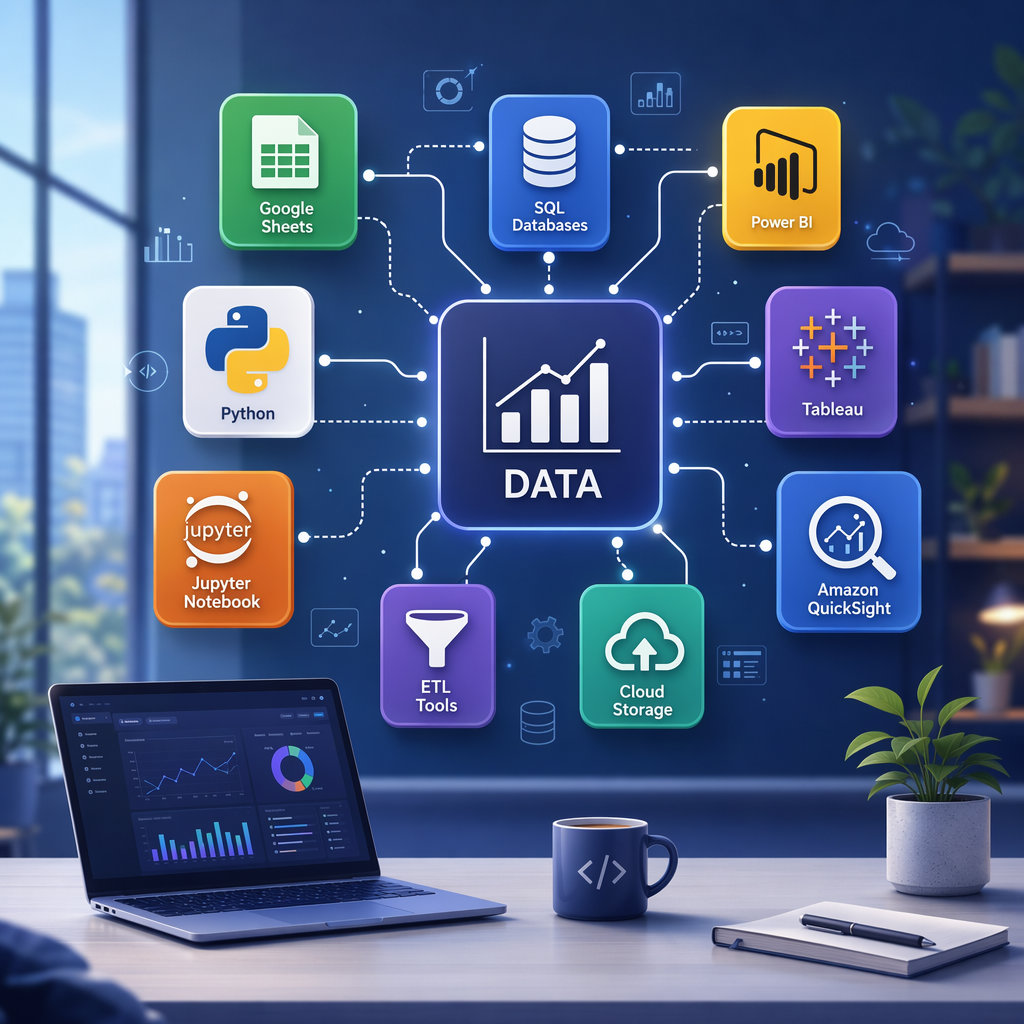 The modern stack uses special tools that each do an important job. Some work on getting the data, some help store it, and others help change it or report on it. With cloud computing, you can use the mix of tools that works best for you.
This flexible setup is one reason many people like using modern data stack tools. You do not have to use one big system for everything. You can mix data transformation tools, orchestration tools, and bi tools. This helps your setup grow as your business grows. Here are the main tools in the modern stack you should know about.
Popular ETL and ELT Tools
ETL tools and ELT tools both help to move data from where it starts into a main place. They do this in different ways. ETL will change the data before it gets loaded. ELT will load the data first, and then make changes inside the warehouse. In cloud infrastructure, ELT is very common now.
A few tools help teams do this work. Fivetran and Stitch let you automate data integration from both business apps and databases. Airbyte is another tool that many people use in modern setups. These platforms cut down on how much you need to do by hand. They also help your data processing stay fast as your systems grow.
Teams use these tools to:
Connect cloud apps, databases, and APIs
Load data to a warehouse with less custom code
Run repeat jobs with many source systems
If your company is working with a lot of channels, having strong ETL or ELT tools gives you a cleaner and more dependable starting point for your data.
Role of dbt in Data Transformation
Dbt is important in modern data and data transformation. It lets teams take raw tables and turn them into business data you can trust. Instead of doing the cleanup just one time, you set up rules that you can test, use again, or make better as time goes on.
dbt helps with data modeling, too. Teams use it to set up clear links between datasets. They build business views and write down how they get their metrics. This makes data analysis much easier for analysts. It also helps to keep new reports on the same page.
dbt supports data quality monitoring by letting you run tests and check if your data is good at every step. If your data is clean and you can trust it, your analytics gets better. Machine learning also does well with good, steady data. Using dbt in the modern stack is good for both AI, data quality, and analytics.
How Airflow Streamlines Workflows
Airflow helps companies set up complex data pipelines. It does this without people needing to start tasks by hand. Airflow is a system for scheduling and keeping track of work. It makes data processing and moving data through different steps easier. This covers loading, changing, and reporting data.
One big plus of using Airflow is control. The user can pick which job comes first and what has to follow. Airflow also lets teams decide what action to take if a job fails. This makes data pipelines more steady. It gives your data teams a better way to handle regular and real time data workflows.
For businesses that are getting larger, this is very important. As more data sources and reports come in, problems in data pipelines can grow fast if not fixed. Airflow lets data teams see what is going on with each job. This helps keep things working well. With Airflow, scattered processes come together into clear workflows. These managed workflows help businesses scale their data work and trust how things run.
Snowflake as a Cloud Data Warehouse
Snowflake is a cloud data warehouse that many people use for storing data and running reports. It lets a business store a lot of data and use it for reports and analytics in one place. People like it because teams do not need to do constant work on the tech side—the system manages that for them.
This is good for big data. As a company gets more and more data, Snowflake helps you store data in one spot. You can run reports and work with your data without the limits you might get from older tools. It fits many needs like data sharing, AI, and making reports.
For leaders, it is fast and clear. If your data is clean and is in one strong data warehouse, your team gets answers quicker. This helps you make good business decisions. There are fewer slowdowns, and both your analysts and business users can look at and use the same source for the facts they need.
Benefits of Adopting a Modern Data Stack
 Businesses switch to a modern setup because they want things to be faster. They need better ways to grow, improve data analytics, and work smarter every day. Modern tools let teams move and change quickly, instead of getting held back by old, slow systems.
These changes also help build a better data strategy. With better ways to use automation and simpler workflows, your teams can turn data into actionable insights. The results show up in reporting, AI projects, daily work, and how people work together. In the next parts, you will see how this helps in real life.
Increased Data Agility and Scalability
A big plus of the modern stack is data agility. Teams get to connect sources faster, set up new workflows with less effort, and change reports without building it all again. This helps a lot when business needs keep changing.
Scalability is another strong point. With cloud infrastructure, storage and compute power can go up as you need more. You do not have to make the same old hardware buys you needed in past systems. This makes it simple to work with large volumes of data for more teams and more use cases.
For data teams, the modern stack means they spend less time dealing with system limits. There is more time for useful analysis, better pipelines, and making sure delivery works. It does not matter if you are growing quick or adding new digital channels; with a modern stack, you scale without slowing down or losing control over your work.
Enhanced Business Insights with AI Analytics
A modern stack does more than just help with reporting. It helps make things right for AI analytics and deeper data analysis. When your data is clean, all in one place, and easy to get fast, your business can move from just dashboards to better ways to help make decisions.
This is important for machine learning and other advanced use cases. Companies use these new systems for things like recommendation engines, following what customers do, planning for demand, and fraud detection. All these use cases need good access to data, strong processing, and high-quality data across the modern stack.
In the end, companies get more actionable insights. Teams can do more than only watch what happened in the past. Now they can spot patterns, say what could come next, and do something quicker. That is the reason the modern stack is important for AI, use cases, analytics, and data analysis. It lets models and people work with good data day by day.
Improved Collaboration and Data Governance
When data is easy to find and people trust it, everyone can work together better. Analysts, engineers, and business users all get to use the same systems. They do not have to make their own reports by themselves. This helps clear up confusion, so teamwork is much faster.
A modern setup also makes data governance stronger. Policies, observability tools, and cataloging help groups watch flows, follow assets, and keep things consistent. This helps keep data integrity strong. Teams also know where information comes from and how to use it the right way.
Better data access adds value, too. More people in the business can use information on their own, without waiting for someone to help every time. For data professionals, this means they do not repeat the same work again and again. They get to spend more time on new ideas and bigger goals. For business users, it means they can trust the data they see each day and make better choices.
Transitioning from Legacy to Modern Data Stack
Switching from legacy stacks to a modern data stack is more than just changing tools. You change your entire data infrastructure, update your workflows, and shift your data strategy. The main goal is to cut down on bottlenecks. You also want a setup that is easy to scale and manage.
A strong migration plan starts with clear business priorities. You should know what is broken, what to move first, and how to keep data quality safe during the switch. The next sections will show you how to notice when you need an upgrade, important migration steps, and real ways to fix common problems.
Recognizing Signs You Need an Upgrade
Sometimes you can see it's time for a change. Reports run slow, data requests start to stack up, and people do not trust the numbers anymore. In many companies, this shows that legacy systems are stopping growth and making things harder for all.
You may see more problems with data quality and limited data access. When your systems do not talk to each other, business users cannot get what they want without help from tech teams. This makes choices slow and can upset many at work.
Common warning signs are:
More data silos between tools or teams
Slow report times with more manual steps
Less trust in dashboards or numbers that are often wrong
Trouble adding new data or helping with real time needs
If you see any of this, your current setup likely needs an upgrade.
Migration Steps and Key Best Practices
A good migration begins with clear business needs, not just picking tools. First, decide what you want to make better. This could be faster reports, cleaner data, or better support for AI and data analysis. After that, look at your current systems and find out where there are problems.
Next, take things step by step. Many groups move their storage and ingestion first. Then they add things like transformation, orchestration, and analytics. This makes the change less risky and gives people time to get used to it. During the move, it is very important to keep your data quality strong and write down key definitions clearly.
Here are some best practices:
Start with one high-value use case, then grow from there
Set up governance and monitoring early, not late
Pick modular tools that match your team’s size and skills
This keeps your move smart and helpful.
Challenges and How to Overcome Them
Even when you have a good plan, moving your data can be hard. The number of tools can grow fast, costs can go up and down, and some teams may not know much about new platforms. If there is not strong data governance, these problems can spread everywhere.
The best thing to do is set up a clear structure. Good data governance helps keep change in check, shows who runs what, and keeps all systems moving together. You also need a strong plan for data integration. This stops broken pipelines and does not let teams do the same work twice. Make clear rules for how data should move, who runs each part, and how you will check the quality.
Here are some good ways to solve problems:
Create an owner for every key dataset and every group of data
Use monitoring to spot issues with your pipelines and with data quality right away
Train your teams, so they know what to do and don’t slow down after you start
If you add these steps, your data management will be steady and you will not have to fix things all the time.
Conclusion
To sum up, using a modern data stack is very important for any business that wants to improve what it can do with data and get better insights. When you know the main parts and what you get out of it, you can work faster with your team, share ideas more easily, and have better ways to look at your data. When you move from old legacy systems to a new and strong setup, your team will do better work, and your business can use AI to look at data in smart ways. When you think about making this big change in your data strategy or working with modern data, remember that the right help can make things simple. If you are ready to move your data strategy forward, you can book a free consultation with us to see how we can help you.
Frequently Asked Questions
What is the difference between dbt, Airflow, and Snowflake?
Dbt is for doing data transformation and data modeling in your data warehouse. Airflow is for setting up the timing and following the steps of workflows across different systems. Snowflake is the cloud data warehouse. You use it to store data and do your analytics work. When you use dbt, Airflow, and Snowflake together, you get a full and new way to do your data pipeline.
How does the modern data stack enable AI-powered analytics?
A modern data stack helps with data processing, quality, and how we get data. These things are important for AI analytics and machine learning. When the data is in one place, clean, and up to date, teams can build models faster. They can see patterns and get actionable insights more quickly and with more trust.
What are best practices for building a modern data stack for Indian businesses?
For businesses in India, it is good to start with clear goals. Pick modular tools, and make sure you take care of data quality from the first day. You should build your data stack to fit what your business needs, not just for what is trending. A strong data strategy will help. Roll out changes step by step. When you train your team, it makes using new things easier and it becomes more useful as time goes on.