







.png%3Falt%3Dmedia%26token%3De8cc1566-8cf9-4c27-b319-5343c9a06f04&w=3840&q=75)
LangChain vs LangGraph: Which One Should You Learn?
Key Highlights
LangChain is better for simple AI orchestration, fast prototyping, and common AI applications.
LangGraph is stronger for agentic AI, long-running logic, and advanced ai agent workflows.
The biggest difference is flow design: LangChain favors sequence, while LangGraph uses graph-based workflow automation.
Both support tools, APIs, and data sources for seamless integration in modern projects.
The LangChain ecosystem is larger and easier for beginners to start with.
Your best choice depends on workflow complexity, state needs, and production goals.
Introduction
If you want to build ai applications with language models, it is common to look at LangChain and LangGraph early on. Both can help you use generative ai with your own tools, data sources, and the business logic you need. But each framework has its own strong points. One is best for fast and structured work, while the other lets you build agents that can act in flexible ways. So, which should you use first, and which is better for your project? Let’s talk about this in a simple way. For beginners, LangGraph is generally considered easier to set up and use than LangChain. LangGraph offers a more straightforward interface and workflow, making it accessible if you’re just starting to build with language models, while LangChain can be more flexible but may require a steeper learning curve.
LangChain vs LangGraph – Quick Answer for India’s AI Developers
 Here is the short answer. If you want to get started fast, LangChain is the way to go. It is good for rapid prototyping. The setup is easy, and it works with many ai models, vector databases, APIs, and external tools. LangChain is helpful when you make chatbots, document Q&A, and RAG-style apps. These need a clear path to follow. For a lot of developers, the biggest win is ease of use.
LangGraph is better when you have an ai agent that needs to loop, branch, pause, recover, or remember what it did over many steps. LangGraph is made for tough agent workflows and you will have more control if your app is running in production. To keep it simple, use LangChain for building fast. Use LangGraph if your flows are more complex. Model performance mostly depends on the ai models you pick. But LangGraph can make your workflow more reliable in complex systems. Currently, there are few publicly available performance benchmarks directly comparing LangChain and LangGraph. Most performance insights are based on user case studies and anecdotal reports rather than formal benchmarks. It is recommended to run tests specific to your application's needs to determine which framework performs better in your scenario.
What Is LangChain?
LangChain is an open-source framework that lets you build cool things with language models. It comes with a set of tools that help with prompts, chains, memory, getting information, and tool use. You can use this to turn the raw output from models into real ai capabilities for your products. Currently, there are limited published performance benchmarks directly comparing LangChain and LangGraph. Both frameworks are evolving rapidly, so new benchmarks may emerge as more developers explore their capabilities and differences in production environments.
The way it is built is known for using linear workflows. So, one step happens, and then the next step comes after it. For example, you might load documents, use prompt engineering, call your model, and then format the answer. This makes the ai workflow easy to understand and fast to try out.
This setup is also what makes LangChain different from LangGraph. LangChain is made for step-by-step projects, while LangGraph works better if you need branching and state-heavy logic. LangChain became popular because it’s easy to start with and gives people building blocks they can use again and again.
What Is LangGraph?
LangGraph is a tool you can use to build AI systems that need to remember past steps or choices. It is part of the same ecosystem as other tools, but it takes a different approach. With LangGraph, you work with a graph structure, which is made up of nodes and edges, not a straight line.
This makes a big difference when your app handles complex workflows. Sometimes, a process must try again, split into different paths, wait for someone’s say, or go back to a step before. With LangGraph, you get stronger state management. The system can remember where it was and pick up when asked. You get the tools you need for good workflow automation and also for designing agents that handle many steps.
If you look at how they are built, LangChain works by connecting blocks in order, one after the other. But LangGraph uses a graph, so data flow is managed across all the parts of that graph. This gives you better options for new ways of working, keeping data between steps, and advanced state management, which is important when you want something strong enough for real work with complex workflows.
Key Differences in AI Orchestration
AI orchestration means bringing together models, tools, data, and rules to work in one ai system. The two frameworks both help you do this, but each takes its own way. LangChain makes things simple for common apps. LangGraph gives you more control, so you can set up dynamic behavior.
With LangChain, the orchestration usually goes in one planned direction. With LangGraph, the orchestration can have loops, pauses, ways to recover, and branching based on conditions. Because of this, ai agent workflows often feel more real in LangGraph when tasks do not follow a clear or simple path.
LangChain works well for simpler orchestration platforms and for fast builds.
LangGraph supports more complex ai agent workflows where the path can branch off.
LangChain is easier when you want seamless integration and less setup.
LangGraph is better when your process changes based on what happens as you run it.
So, the way ai orchestration works is different for each one. This is because one is good for simple steps in a line, and the other is good when you want more control in your execution path.
Best Framework for Agent Workflows and Use Cases
If you want your assistant to do simple tasks, you can use LangChain. It works great for chat, search, making things shorter, and getting info from data. The best use cases for LangChain are when your app does things in a set order and does not need to remember much.
You should go with LangGraph when you need agentic ai that must think through many steps. If your system needs to use tools, keep track of things, or deal with changes while working, LangGraph was built for that. This is the better choice when you have complex workflows or advanced ai agent workflows. In these cases, you need a graph model and not a plain data pipeline.
Go with LangChain if you need chatbots, RAG, document Q&A, or if you want to build prototypes fast.
Use LangGraph for creating autonomous agents and tasks that run a long time.
LangGraph is the right pick for systems with retries, approvals, and dynamic routing.
LangChain works best with data pipelines where the output is predictable.
In the end, your use cases and needs matter more than what is popular when you want the better choice for your project.
Quick Comparison Table of Features
A quick table makes the comparison easier. Both frameworks share some foundations, but their key features support different goals. LangChain offers modular components for standard LLM apps. LangGraph is aimed at advanced workflows with more control.
Feature | LangChain | LangGraph |
|---|---|---|
Architecture | Chain-based | Graph-based |
Workflow complexity | Low to medium | Medium to high |
State handling | Basic to moderate | Strong, explicit |
Conversation history | Supported through memory modules | Persistent, state-driven |
Best fit | Rapid prototypes, RAG, chat | Agents, loops, approvals |
Debugging visibility | Good with ecosystem tools | Strong for workflow tracing |
There are no fixed universal performance benchmarks in the provided material, and raw speed often depends on the model and infrastructure. Still, LangGraph usually offers better control and reliability when workflow complexity grows, while LangChain stays easier for fast delivery.
Deep Dive – Understanding LangChain
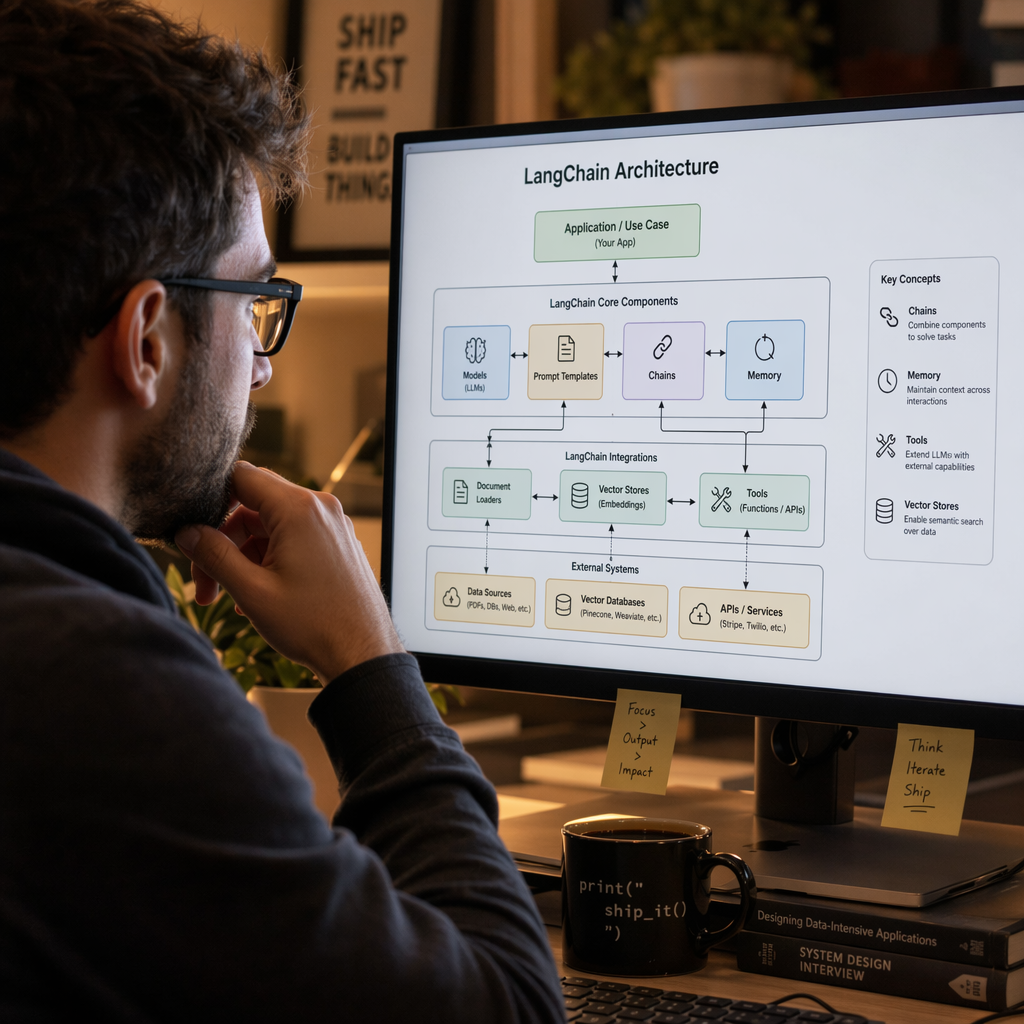 LangChain became well-known because it lets people link models, prompts, tools, and data sources without the need to build everything from the start. Its chain setup feels right when your ai workflow moves from one step to the next in order that is easy to follow.
For many teams, this easy setup is more important than having full control. It lets you set up ai components in a clear way, try out new ideas fast, and tie in outside services with less work. Before you pick one of the two frameworks, it is good to know how LangChain works inside.
Core Architecture and AI Orchestration Capabilities
LangChain has a core architecture that uses reusable parts. You can take prompts, models, retrievers, tools, and memory and put them together in one flow. Its modular design is one of the main reasons people picked it up quickly. You can change providers or tools without having to build it all again.
Its ai orchestration style is simple. When you send in a request, it moves through the steps you select. Then it sends back an answer. These orchestration tools work best when you know the task path ahead of time. This is good for things like search, summarization, document retrieval, and standard chatbot work.
LangGraph is different because it gives you more control. LangChain is good at ai orchestration for direct flows. But it does not focus on state machines that branch in different ways. If you need strong loops and changes while things run, LangGraph lets you control workflows more. If you do not need that, LangChain feels cleaner and quicker to use.
LLM Application Development with Chains, Tools, and Memory
LangChain makes it easy to build apps that use large language models by putting actions together in chains. In a chain, each step links to the next. This might be reading user input, using prompt templates, running a model, or shaping the result for the user. This way of working is simple to use, so it is smart for getting started with your first project.
You can also use LangChain for data integration. It works well with APIs, files, databases, and tools that help you get or send information. This is important because most good AI apps do not just create text. They also pull from data, use different tools, and mix what they get from more than one service. LangChain can handle short-term memory too. For example, it remembers recent chat history.
The LangChain community is another strong point. It became well-known quickly, so there are many developers, guides, and working examples to help you. It links well with LangGraph and fits into the same big ecosystem, though LangChain still offers more beginner help and simple learning tools.
Why LangChain Became Popular in India’s GenAI Community
LangChain became popular because it made genAI tools useful for many. Teams could use it to build test apps fast. You could link an AI model to your business data and show results quickly. There was no need to wait for a long and complex design plan. This speed is what both startups and big companies need.
Many teams start with simple natural language work. They use it for search, chatbots, talking about files, and tools that help with writing or understanding content. These jobs are usually about making things better for customers and helping people get to their data, not about building tools that work all by themselves for a long time.
It helps you do rapid prototyping for early ideas.
It connects to data sources, APIs, and vector systems in a simple way.
It works for everyday natural language processing tasks and helping in business work.
It is easy for the community to find help because there are many shared examples.
You can use both LangChain and LangGraph in one app. LangGraph can use the same style of pieces from LangChain when a project starts to get harder and needs more steps.
Exploring LangGraph for AI Agent Workflows
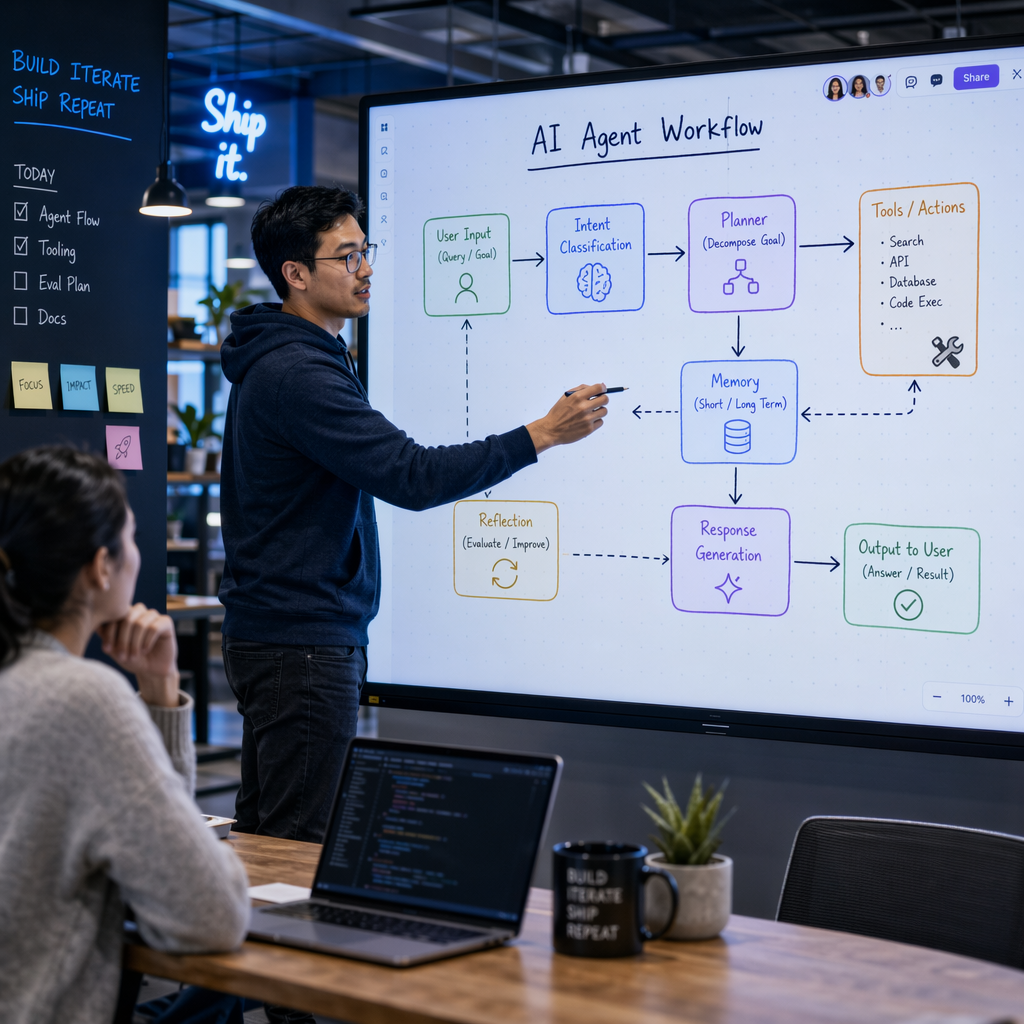 LangGraph was made for ai teams who needed more than just step-by-step runs. The graph structure lets you have more freedom. You can branch out, do things again, pause, or fix something if needed. This is key for agent workflows, where choices can change based on what's happening right then.
As your projects get bigger, you will see the value more. It handles state management well, so your system will know where it is, what it did, and what to do next. Because of this, LangGraph works better for complex workflows with ai agent tools that need to be solid and reliable for a long time.
Graph-Based Approach and State Management
LangGraph works with a graph structure. In this setup, each node is a task and each edge controls how the workflow goes forward. This means you get a more flexible model than a simple chain. The system can move back to old steps, pick new paths, or wait for input from outside.
This flexibility comes from clear state management. LangGraph does not hide context in other tools. Instead, it lets you watch the data flow directly. This helps when advanced workflows involve conditional logic, retries, or running for a long time with state kept between sessions.
Nodes show what actions or choices to make.
Edges show how steps connect or change.
State keeps context through the workflow.
Conditional logic sets what comes next in a dynamic way.
If you are new, LangGraph often will not be easier to start with than LangChain. It gives more power, but you have to do more design work and face a steeper learning curve.
Keywords: state management, graph structure, conditional logic, data flow, advanced workflows
Advanced Agent Orchestration in Production Applications
LangGraph is made for agentic ai when you need to work through many steps with more reliability. In real use, an agent can call external tools, check what comes back, wait for review, and go on only when the right things happen. This kind of control is tough to handle in a plain chain.
Its workflow model lets you use modular components. So you can still work with the prompt and tool logic you know. The difference is how the system handles the way these parts work together over time. This helps when you work with complex processes where things do not always happen in the same order.
Agentic workflows stand out because LangGraph treats the agent like a stateful thing, not just many calls in a row. LangChain fits for some agent behavior, but LangGraph is better when you need lots of steps, retries, changes in route, and long-lasting execution with agentic ai, modular components, and external tools.
Why LangGraph Was Introduced for Complex AI Workflows
LangGraph came out because developers needed more control for complex workflows. A simple chain is fine at first, but things change when your app has to branch out, loop, recover from errors, or keep state for a long time. That’s when it’s better to use a graph for how things run, instead of forcing every step into order.
This change is important for complex business processes, too. Big companies care about things like reliable results, human oversight, and being able to track steps. If your system has to decide about approvals, support, or rules, you need clear checkpoints and an easy way to see how things move.
It gives you dynamic routing, not just one set path.
It helps keep state during long processes.
It adds better control when the system needs checks and a lot of review.
Because of all this, LangGraph is here to help with real challenges that come up as AI tools move from just demos to handling complex business processes and workflow orchestration with more human oversight.
The Importance of AI Orchestration in Modern Applications
 AI orchestration is important because useful AI is not just about using one model. In real situations, you have many parts working together. These can be models, tools, storage, APIs, and users. Orchestration platforms help all these pieces work in the right order and with the right data. This helps cut down on errors and things running at the wrong time.
When you work with ai agent workflows or complex workflows, good coordination is even more needed. Without strong orchestration, things can break. For example, data integration might not work, tools may start or stop at the wrong time, and it is easy to lose context. If you want to pick between LangChain and LangGraph, you need to see ai orchestration as the thing that holds all of production AI together.
Workflow Management and Tool Execution
Workflow management is really about picking what needs to happen first, what comes after, and what to do if something goes wrong. When you manage an ai workflow, tool work is part of this. The model might need to use a search API, look inside a database, or start another service before it gives a good answer.
If you have good orchestration, you cut down on repetitive tasks. This will also help keep things clear in the ai workflow. LangChain gives you speed and simplicity. LangGraph gives you more control and strength when things go wrong. So, their pros and cons are about what your ai workflow needs, not which one has a bigger name.
LangChain works faster with simple flows and is easy to start using.
LangGraph can handle more problems and changes in the path.
LangChain may not work well when you get too many branches.
LangGraph takes more time to plan, but it gives you better control.
For best practices, always keep your work steps clear, let tools be seen, and be careful when you face failures.
Planning, Memory Handling, and Enterprise Use Cases
Planning is what helps turn what comes out of a model into real action. An ai system should know when to get data, when to use a tool, and when to ask for help. If the use cases are simple, there is not much need for planning. If the ai system gets more complex, planning starts to be very important.
How you handle memory also matters a lot. Some apps only save the short conversation history. Other apps have to keep state for longer periods, like for longer tasks, tries again, or when waiting for someone to say yes. This is why companies that have complex systems often move toward better ways of managing these steps. They do not only need to remember things for a little while, but to keep their context safe for a longer time.
If you need support, LangChain has the bigger group of people and helpers because it was around first. It brought in more easy guides and ways to learn for most people. LangGraph uses the same tools and works well in production, but many teams still see LangChain as the best pick if you are just getting started.
Real-World Examples Relevant to Indian Tech Teams
When you look at common business processes for tech teams that are growing fast, you will see the need for the right tools. For example, if you need a customer support bot that can use internal documents to answer questions from staff or clients, you can build that with LangChain. It works by linking models with data sources. It helps you get value fast and keeps things under control.
But what if the process is longer? Some ai applications need an ai system to check requests, move through many tools, send tougher cases up for help, and wait for approval before it does anything. This kind of job fits LangGraph better. LangGraph works well, especially for sensitive data or processes that take many steps and need more control.
LangChain is good for bots that use internal knowledge or that act as document helpers.
LangGraph fits when you have automation that needs approval or a long-running agent.
Both LangChain and LangGraph can help you build ai applications that mix models with outside systems.
The better choice depends on your workflow. If you want something that mostly does the job right away, one will work. If you have a lot of state or many steps to keep track of, the other can be the answer for your team.
Feature Comparison – LangChain vs LangGraph
A good feature comparison means more than just looking at the names of things. Both frameworks use the same core components, but each is made for a different way to run tasks. LangChain is best for speed, making life easier for developers, and building common large language model apps. LangGraph, on the other hand, is built for better handling of state, more control, and stronger workflow behavior in ai agent workflows.
When ai agent workflows become more dynamic, things can get complex very fast. This is where you see the big difference between the two. The next sections talk about how they handle architecture, learning, memory, debugging, and scaling. This will help you pick the best one for your real project needs.
Architectural Differences: Chains vs Graphs
LangChain architecture builds on chains. A task goes step by step in a line for an ai workflow. This works well when you know the input and output, and the process does not need to switch direction much. The modular design helps you put parts together without trouble.
LangGraph architecture builds on graphs. A graph is best when the system must go back to choices, split by condition, or switch between many states. Here, conditional logic is a main part of how things work, not something you just add later.
Chains work well for steps in a row.
Graphs fit times you need loops and paths that can branch.
LangChain makes more complex things simpler by using helpers.
LangGraph gives you more control to arrange things your way.
So, the main architecture difference is easy to see: LangChain links steps, but LangGraph goes with different paths. Pick the one that fits best with your workflow structure and what you need for your system’s conditional logic.
Learning Curve and Production Readiness
For someone new to these tools, LangChain often wins for fast setup. The patterns in LangChain can be easier for you to follow. It lets you build quick tests and try out new ideas with little extra work. This is good if you want to test something with prompts, bringing in info, or using user input. The process is smoother at the start.
LangGraph may take a bit more time to get used to. You must learn about nodes, steps, state, and how errors work. This can feel like a lot to take in. Still, having this in place makes it better for work that needs to be strong, that changes a lot, or is important for business.
There are best practices here that may change the way you use each tool. LangChain works better for fast tests and apps that are focused. LangGraph fits well if you must build something more serious, something you will watch over time, or that needs to remember things. Most of the time, LangGraph is not the easier way for someone starting out. Yet, it can be the smart pick if you want something stronger for complex jobs.
Memory, Multi-Agent Support, and Debugging
One of the key differences is how each tool handles memory. LangChain has built-in modules for conversation history and short-term memory. That works well for many chat apps and tools that need to find things fast. LangGraph goes a step further by making state a solid part of how things run.
This is important in agent workflows and when you need to debug. When there are a few agents or steps, you have to see what happened, know why it happened, and decide what to do next. LangGraph gives you a clearer look at what's going on, and that helps if people have to step in.
LangChain does a good job with basic memory for chat-style flows.
LangGraph works with stronger state for agent workflows with more agents.
LangGraph can be easier to check and fix when you're solving tricky problems.
Agentic workflows are not the same. LangGraph marks the state as part of the process, but LangChain sticks to getting each job done in a way that's more simple.
Both tools help, but the way they use conversation history and get people involved in the process can be different.
Best Use Cases, Scalability, and Workflow Complexity
LangChain works well for most regular apps when things are simple. You can use it for chatbots, systems that pull answers, and helpers that look through documents. These are good use cases because LangChain is fast and fits into apps easily. Its value comes from speed and being able to work with other tools, not setting up tough logic.
LangGraph gets more helpful as the tasks get harder. If you need to set up conditional branching, keep trying something until it works, let another task handle something, or save steps along the way, LangGraph can handle these better. This is true when agent workflows change while working instead of always following the same steps. It works well for ai agent workflows that might go different ways each time.
LangChain scales cleanly for common LLM product patterns.
LangGraph scales better for branching and long-running logic.
LangChain is better for direct app delivery.
LangGraph is better for orchestration-heavy systems.
To sum up, both LangChain and LangGraph can grow, but each handles growth in its own way.
Agent Workflows – How LangChain and LangGraph Operate
Agent workflows are the real test for these frameworks in agentic ai. The system has to put together reasoning, tool calls, and context handling across many steps. That means there is a need for more than just text generation. You need workflow automation, so actions and data sources can come together and work well.
LangChain and LangGraph both help with this, but they do it in different ways. One lets you make simple agent behavior fast. The other is made to handle more paths, keep up with state, and give you more ways to run things as time goes on.
Task Planning, Tool Usage, and Multi-Step Execution
Every helpful agent needs to plan tasks. It must figure out what to do, which tool to use, and how to use the results. LangChain helps set up a structured ai workflow, mainly when you know the steps ahead of time. This makes starting much faster.
The way you use external tools is important. Many apps rely on APIs, retrievers, or databases. LangChain connects to these tools well, which is why it fits most assistant setups. But, if you need to use tools when things say change across branches, LangGraph gives you more control.
You see a clear difference with multi-step execution. LangChain sees steps as something that moves in order. LangGraph sees them as a process that can go again, pause, or change direction. This is why agentic workflows built in LangGraph are stronger and work better when things in your environment change.
Context Management and Feedback Loops
Context management decides if your app feels smart or acts like it forgets things. A small chatbot may only use recent conversation history. A bigger system may need to have more state from tools, past choices, and user actions. LangChain can handle lighter context well, especially for simple pipelines.
But things change when you have feedback loops. This means the system has to check its own work, try things again, or wait for human oversight. LangGraph helps more in these cases. Its setup was made for feedback loops instead of forcing them to fit in a way that is not natural.
LangChain is easier for beginners who just want to keep simple context.
LangGraph is better if you need feedback loops and more control.
LangGraph is a good fit for data pipelines, review steps, and times you need to retry something.
So, if you are just starting, LangChain will be simpler. But when deep context and being able to fix things are important, LangGraph gives you more power.
Comparing Workflow Strategies in Each Framework
The main workflow strategies are easy to see when put side by side. LangChain is best when you need a clear plan. It uses prompts, tools, and finding information as the basic pieces. This makes it good for many common LLM use cases. You do not have to create a fix for every single problem or corner case.
LangGraph takes another path. It is made for complex tasks. Here, the steps can change during the process. Conditional logic is part of LangGraph, so the system can make different choices, go back to steps, or fix any mistakes. This changes how ai orchestration works for users.
LangChain strategy: guided sequence with reusable parts.
LangGraph strategy: adaptive graph with explicit state.
LangGraph handles more runtime uncertainty.
In short, LangChain makes common flows easier. LangGraph gives more control and handles complex tasks that have many decisions. That is where you see the biggest change in ai workflow and conditional logic.
Conclusion
In the end, picking between LangChain and LangGraph comes down to what you need for AI orchestration and agent workflows. LangChain is great if you want to build LLM apps fast. It has a simple setup, so it is good for beginners. It works well for things like chatbots and RAG apps. LangGraph uses a graph method that fits people with more experience. It is used when you need to set up tough systems, tricky workflows, or multi-agent groups. Both options, LangChain and LangGraph, have their own strong points. You should look at your project needs before you choose. If you want to try these tools and learn more, you can book a free talk with our experts today!
LangChain vs. LangGraph? Resources & Guidance Needed!
When comparing LangChain and LangGraph, it's essential to explore their documentation, tutorials, and community forums. Resources like GitHub repositories and online courses can provide valuable insights. Engaging with user communities also helps clarify which framework aligns best with your learning goals and project requirements.